

This section contains the following topics:
Standardized Presentation of Logs
The CA User Activity Reporting Module server can be set up to collect logs using one or more supported techniques. The techniques differ in the type and location of the component that listens for and collects the logs. These components are configured on agents.
The following illustration depicts a single-server system, where agent locations are indicated with a dark (green) circle.
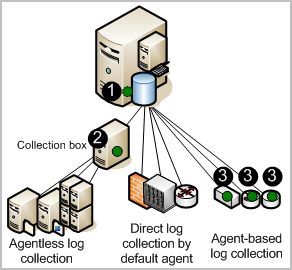
The numbers on the illustration refer to these steps:
Note: Traffic from the agent to the destination CA User Activity Reporting Module server is always encrypted.
Consider the following advantages of each log collection technique:
With direct log collection, you configure the syslog listener on the default agent to receive events from the trusted sources you specify. You can also configure other connectors to collect events from any event source that is compatible with the soft appliance operating environment.
Advantage: You do not need to install an agent to collect logs from event sources that are in close network proximity to the CA User Activity Reporting Module server.
With agentless collection, there is no local agent on the event sources. Rather, an agent is installed on a dedicated collection point. Connectors for each target event source are configured on that agent.
Advantage: You can collect logs from event sources running on servers where you cannot install agents, such as severs where corporate policy prohibits agents. Delivery is guaranteed, for example, when ODBC log collection is configured properly.
With agent-based collection, an agent is installed where one or more event sources are running and a connector is configured for each event source.
Advantage: You can gather logs from a source where the network bandwidth between that source and the CA User Activity Reporting Module is not good enough to support direct log collection. You can use the agent to filter the events and reduce the traffic sent across the network. Event delivery is guaranteed.
CA User Activity Reporting Module provides managed embedded log storage for recently archived databases. Events collected by agents from event sources go through a storage lifecycle as illustrated by the following diagram.
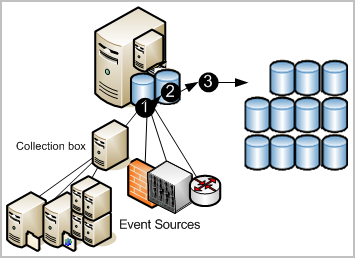
The numbers on the illustration refer to these steps:
Logs generated by applications, operating systems, and devices all use their own formats. CA User Activity Reporting Module refines the collected logs to standardize the way the data is reported. The standard format makes it easier for auditors and upper management to compare data collected from different sources. Technically, the CA Common Event Grammar (CEG) helps implement event normalization and classification.
The CEG provides several fields which are used to normalize various aspects of the event, including the following:
CA User Activity Reporting Module lets you gather and process security-relevant data and turn it into reports suitable for internal or external auditors. You can interact with queries and reports for investigations. You can automate the reporting process by scheduling report jobs.
The system provides:
Its focus is on compliance reporting rather than real-time correlation of events and alerts. Regulations demand reporting that demonstrates compliance with industry-related controls. CA User Activity Reporting Module provides reports with the following tags for easy identification:
You can review predefined log reports or perform searches based on criteria you specify. New reports are provided with subscription updates.
Log view capabilities are supported by the following:
CA User Activity Reporting Module lets you automate the sending of an alert when an event occurs that requires near-term attention. You can also monitor action alerts from CA User Activity Reporting Module at any time by specifying a time interval, such as from the last five minutes to the last 30 days. Alerts are automatically sent to an RSS feed that can be accessed from a web browser. Optionally, you can specify other destinations, including email addresses, a CA IT PAM process such as one that generates help desk tickets, and one or more SNMP trap destination IP addresses.
To help you get started, many predefined queries are available for scheduling as action alerts, as is. Examples include:
Some queries use keyed lists, where you supply the values used in the query. Some keyed lists include predefined values that you can supplement. Examples include default accounts and privileged groups. Other keyed lists, such as that for business critical resources, have no default values. After you configure them, alerts can be scheduled for predefined queries such as:
Keyed lists can be updated manually, by importing a file, or by running a CA IT PAM dynamic values process.
CA User Activity Reporting Module provides three predefined application groups or roles. Administrators assign the following roles to users to specify their access rights to CA User Activity Reporting Module features:
The Auditor has access to few features. The Analyst has access to all Auditor features plus more. The Administrator has access to all features. You can define a custom role with associated policies that limit user access to resources in the way that suits your business needs.
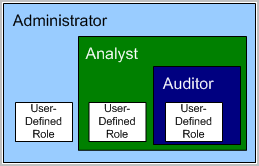
Administrators can customize access to any resource by creating a custom application group with associated policies and assigning that application group, or role, to user accounts.
The subscription module is the service that enables subscription updates from the CA Technologies Subscription Server to be automatically downloaded on a scheduled basis and distributed to CA User Activity Reporting Module servers. When a subscription update includes the module for agents, users initiate the deployment of these updates to agents. Subscription updates are updates to CA User Activity Reporting Module software components and operating system updates, patches, and content updates such as reports.
The following illustration depicts the simplest direct Internet connection scenario:
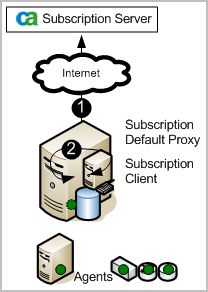
The numbers on the illustration refer to these steps:
Previously, specification of IP Addresses was limited to IPv4 dotted decimal notation. With the current release, you can now specify IPv6 addresses in any IP Address field. IPv6 uses 128-bit IP addresses instead of the 32-bit addresses used by IPv4. Any policies that are based on the IP address version support IPv6 and IPv4.
You can use IPv4-mapped IPv6 addresses or the traditional IPv6 format. The IPv4-mapped IPv6 address format allows the IPv4 address of an IPv4 node to be represented as an IPv6 address as follows:
Important! IPv4-compatible IPv6 addresses in the format 0:0:0:0:0:0:d.d.d.d are now deprecated, according to RFC 4291, because the current IPv6 transition mechanisms no longer use these addresses.
The following is a valid IPv6 address written in traditional format.
2001:0db8:85a3:08d3:1319:8a2e:0370:7334
If one or more four-digit groups are 0000, the zeros can be omitted and replaced with two colons(::). Leading zeros in a group can also be omitted. The following example IP addresses are equivalent:
If you are replacing IPv4 addresses with IPv4-mapped addresses, use the following examples as guidelines:
Alternatively, you can use the following compressed form:
|
Copyright © 2014 CA Technologies.
All rights reserved.
|
|