

Integrating with HP Service Manager › How to Configure an HP Service Manager Integration
How to Configure an HP Service Manager Integration
As an administrator, you integrate HP Service Manager using the following components to integrate CA SOI alert and incident management with the help desk product:
- CA Process Automation
- A help desk-specific connector
- The gateway files that let you configure the CA Process Automation integration processes
CA SOI integrates with HP Service Manager for alert and incident management. CA Process Automation provides this integration with its end-to-end process automation capabilities and the CA Process Automation HP Service Manager Gateway. The CA Catalyst connector for HP Service Manager integrates CA Process Automation with HP Service Manager. CA SOI provides the CA Process Automation HP Service Manager Gateway files that use the CA Process Automation functionality to complete the integration.
After the installation and configuration, the CA Process Automation CA HP Service Manager Gateway integrates CA SOI with HP Service Manager as follows:
- The HP Service Manager incidents are automatically created based on the CA SOI alert escalation policy or manually submitted from the Operations Console.
- When CA SOI sends alert data through the connector, the HP Service Manager system generates an incident with an identifier.
- The identifier is updated in the CA SOI alert and associates the incident with the alert. The alert data provides a description of the problem for the incident.
- After the associated problem is resolved, the CA SOI alert and HP Service Manager incident can be optionally cleared automatically.
- CA SOI can automatically close any ticket that is opened after an alert has cleared. To enable this option, see Review Alert and Ticket Closure Considerations.
- An alert annotation that is created for a CA SOI alert is reflected on an HP Service Manager incident. Similarly, an HP Service Manager incident journal update entry is reflected in the CA SOI alert annotation table.
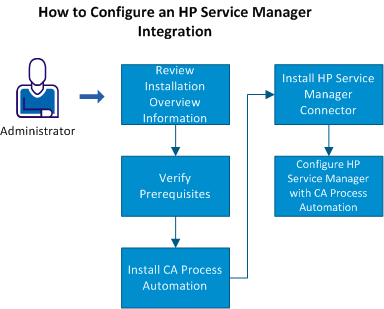
- Review the installation overview information.
- Verify the prerequisites.
- Install CA Process Automation.
- Install the HP Service Manager Connector.
- Configure the HP Service Manager integration with CA Process Automation.
Copyright © 2013 CA.
All rights reserved.
|
|