

|
|
|
The Functionality taskbar section of the home page provides a means to initiate the various CA ARCserve D2D On Demand functions.
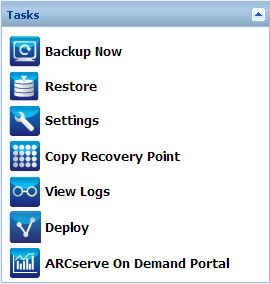
Lets you run a Full, Incremental, or Verify ad-hoc backup immediately based on current backup settings. The backup settings are configured and defined through the Backup Settings. For more information, see Run Backup Now.
Lets you perform file level or application-level restores to the original location or to an alternate location. When you select this function, you then specify to which restore option you want to use to locate the backup image to be restored. For more information, see Restore Methods.
Lets you configure/modify the following settings:
Lets you view a list of available recovery points (successful backups) and select which recovery point you want to use to create a consolidated copy. This consolidated copy combines the blocks from the previous full and all incremental backups leading to the selected recovery point. In addition, the consolidated copy also removes any unused blocks (reducing the image size) to lets you gain more efficient use of your backup resources.
Each recovery point represents a point in time that a VSS snapshot image was captured and contains not only the data, but also all information related to the operating system, installed applications, configuration settings, necessary drivers, and so on. For more information, see Copy Recovery Points.
Lets you view logs of activities performed during operations such as backup, restore, and copy. The Activity Log displays the status of the job, including such details as the throughput, compression size, elapsed time, encryption status, and so on. For more information, see View Logs.
Lets you deploy CA ARCserve D2D On Demand to remote machines. For more information, see Deploy CA ARCserve D2D On Demand Remotely.
The ARCserve On Demand Portal is your link between CA ARCserve D2D On Demand and the CA Cloud. This portal provides two separate views, depending on the role accessing the portal: Customer role and Partner role. The ARCserve On Demand Portal lets you manage licenses, cloud storage space, and the individual devices (or customers) within your account.
For more information about this portal, see Manage the ARCserve On Demand Portal.
| Copyright © 2012 CA. All rights reserved. | Tell Technical Publications how we can improve this information |