

|
|
|
The ARCserve On Demand Portal is your link between CA ARCserve D2D On Demand and the CA Cloud. This portal provides two separate views, depending on the role accessing the portal:
This ARCserve On Demand Portal lets you manage licenses, cloud storage space, and the individual devices (or customers) within your account. To help manage your account, this portal provides a dashboard-type storage summary for all devices within your account (Customer role) and all customers within your master account (Partner role). This snapshot overview lets you quickly and easily monitor relevant information and help you manage your CA Cloud storage environment. In addition, through this portal, CA ARCserve D2D On Demand automatically monitors and sends alert notifications to your specified email addresses when certain thresholds are reached, such as when you are approaching your account expiration date or when your used storage space is approaching your total storage space limit.
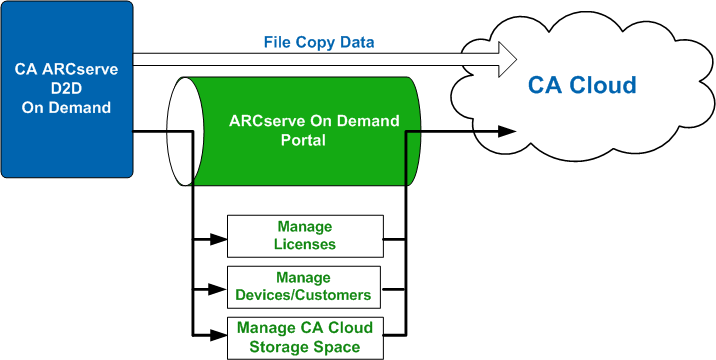
This portal provides menu options to let you perform such functions as:
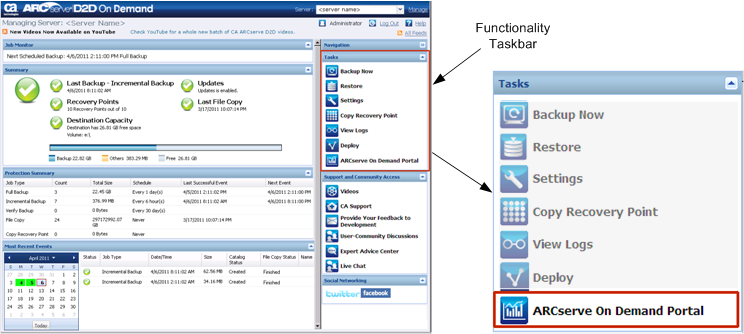
The ARCserve On Demand Portal is accessed from the functionality taskbar on the CA ARCserve D2D On Demand homepage. You must provide proper credentials (user name and password) to gain access to this portal.
| Copyright © 2012 CA. All rights reserved. | Tell Technical Publications how we can improve this information |