

QueryStartRequests
The QueryStartRequests operation lets you query a start request form instance for the start request Status and the associated Process instance ID.
Follow these steps:
Username: (Catalyst user name)
Password: (Catalyst password)
Claims:
ClaimName: Username
ClaimValue: pamadmin
ClaimName: Password
ClaimValue: pamadmin
CatalystBrokerURL: https://hostname:7443/ucf/BrokerService
MdrProduct: "CA:00074 (CA Process Automation)"
MdrProdInstance: "CA:00074:01"
Operation Category: "CA Process Automation"
Operation: QueryStartRequests
Instance: "SRF_Queue_x" (where x is the instance ID of the start request form that you want to query). For example, "SRF_Queue_5829".
IsArchived: "false"
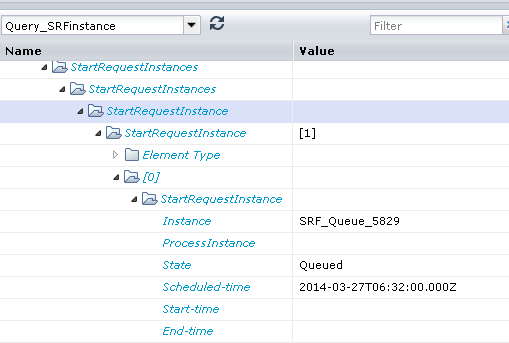
In the following illustration, the output parameters display the start request form in the queued state.
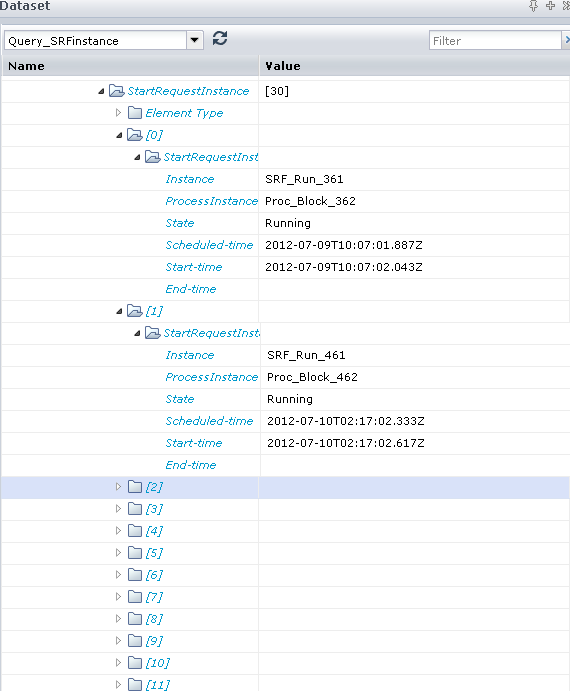
In the following illustration, the output parameters show a list of all the archived start request form instances. To get archived results, do not include the instance name in the input parameters, but provide true or false for the IsArchived parameter.
|
Copyright © 2014 CA.
All rights reserved.
|
|