

SubmitStartRequestForm
To submit a start request form, use the SubmitStartRequestForm operation.
Follow these steps:
Username: (Catalyst user name)
Password: (Catalyst password)
Claims:
ClaimName: Username
ClaimValue: pamadmin
PasswordClaims:
ClaimName: Password
ClaimValue: pamadmin
CatalystBrokerURL: https://hostname:7443/ucf/BrokerService
MdrProduct: "CA:00074 (CA Process Automation)"
MdrProdInstance: "CA:00074:01"
Operation Category: "CA Process Automation"
Operation: SubmitStartRequestForm
"SRF_Queue"
The absolute path of the start request form (you can get the path from the properties of a start request form). For example: SRF"/REST_Methods/SRF_support/SRFs_test/".
Var_0
from_proc
and
Var_1
from_prc2
"2012-08-31" (yyyy-MM-dd)
"12:25" (HH:mm)
No value
Note: If you do not set StartDate and StartTime, CA Process Automation schedules the start request form immediately.
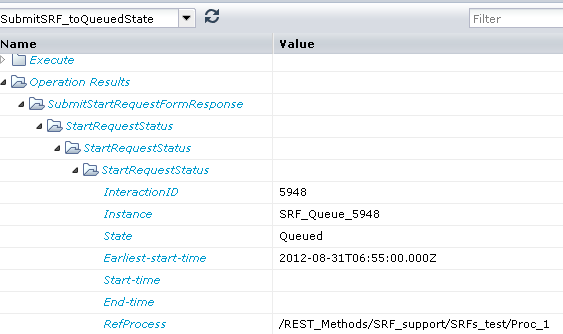
When the operator runs, CA Process Automation schedules the specified start request form in the server. As the following illustration shows, the output parameters include results such as the start request form instancesID, State, and associated process details.
|
Copyright © 2014 CA.
All rights reserved.
|
|