

In this example, the administrator configures the Root Cause Analysis Setting to Domain Manager. In this case, the domain manager is CA Spectrum, so CA Spectrum determines the root cause analysis and symptoms.
The MDR Root Cause and MDR Symptom columns, which the user manually added, show the alerts that CA Spectrum determines are the root cause and symptoms, respectively.
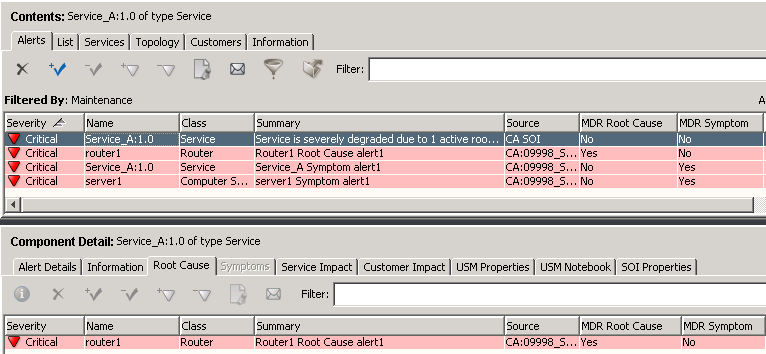
CA Spectrum determined that "router1" is the root cause and "server1" is the symptom. Therefore, if you select Service_A (with either CA Spectrum or CA SOI as the source) or "server1", the Root Cause tab shows "router1" as the Root Cause. This is in contrast to the CA SOI derived root cause analysis example, where CA SOI determined that "Service_A" was the root cause.
If you select "router1", which is the root cause, the Symptoms tab shows "server1" and "Service_A" as the symptoms as determined by the domain manager, CA Spectrum.

|
Copyright © 2013 CA.
All rights reserved.
|
|