

In this example, the administrator configures the Root Cause Global Setting to CA SOI for the root cause analysis. In this mode, CA SOI determines the root cause and ignores the root cause determined by the domain manager (CA Spectrum).
CA SOI uses the service impact to determine the root cause. In this case, the administrator has not modified the default significance for the CIs, so CA SOI determines that "Service_A" (with a significance of 10) is the root cause and not "router1" (with a significance of 9). As you will see in subsequent examples, the domain manager (CA Spectrum) determines a different root cause than CA SOI. This demonstrates not only the importance of using significance to determine service impact, but also determining which root cause analysis mode you set.
Because CA SOI determined that "Service_A" is the Root Cause, selecting the "Service_A" alert or CI shows "Service_A" (with CA SOI as the source) as the root cause.
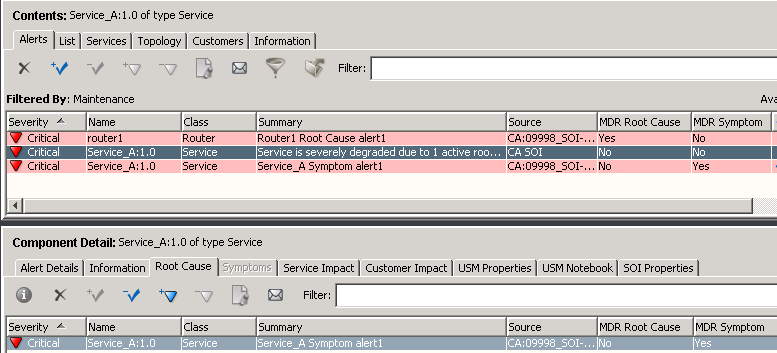
However, if you select "Service_A" with CA Spectrum as the Source, the Root Cause tab is empty. This is because you are using CA SOI to determine root cause.
Therefore, in CA SOI mode, verify that you are viewing alerts with CA SOI as the Source in the column. CA Spectrum determines the symptoms in this example, not CA SOI. CA SOI calculated the root cause.
The Symptoms tab is disabled because CA SOI has not determined any symptoms, although CA Spectrum has. You can still see "Service_A" as a symptom, but that is according to CA Spectrum, which is not used in root cause analysis.
|
Copyright © 2013 CA.
All rights reserved.
|
|