

UpdateDatasetParameters
Use the UpdateDatasetParameters operation to update the parameters of a dataset.
Note: Before updating a global dataset, make sure that the dataset has been checked in at least once.
Follow these steps::
Username: (Catalyst user name)
Password: (Catalyst password)
Claims:
ClaimName: Username
ClaimValue: pamadmin
PasswordClaims
ClaimName: Password
ClaimValue: pamadmin
Execute
CatalystBrokerURL: https://hostname:7443/ucf/BrokerService
MdrProduct: "CA:00074 (CA Process Automation)"
MdrProdInstance: "CA:00074:01"
Operation Category: "CA Process Automation"
Operation: UpdateDatasetParameters
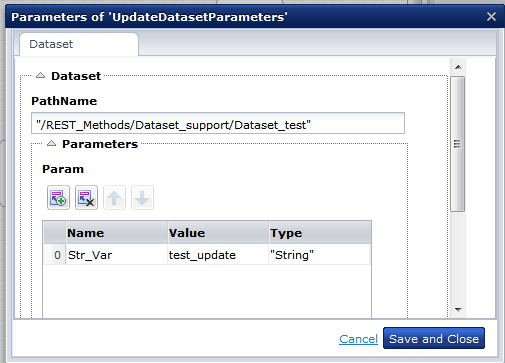
This example shows the dataset parameter of Type "string" with string value:
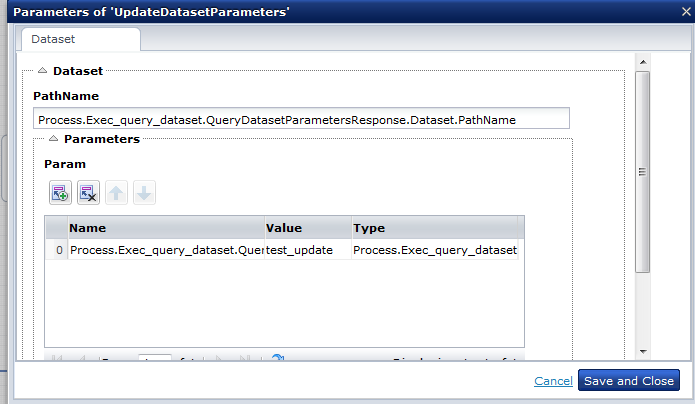
This example shows how to update the Dataset Parameter using an expression:
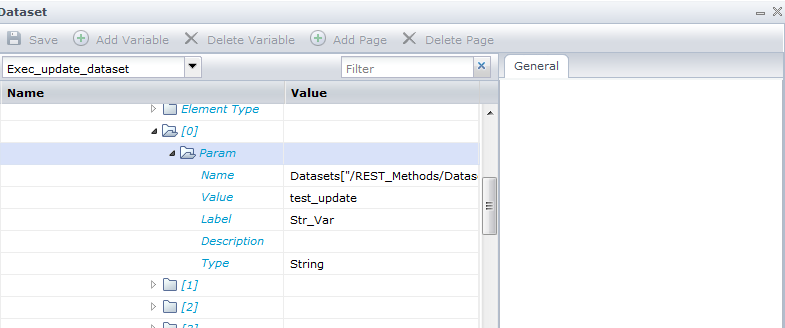
This illustration shows how the dataset parameter of Type "String" is updated with the given value "test_update".
|
Copyright © 2014 CA.
All rights reserved.
|
|