

AbortStartRequest
To end a start request form instance, use the AbortStartRequest operation.
Follow these steps:
Username: (Catalyst user name)
Password: (Catalyst password)
ClaimName: Username
ClaimValue: pamadmin
ClaimName: Password
ClaimValue: pamadmin
CatalystBrokerURL: https://hostname:7443/ucf/BrokerService
MdrProduct: "CA:00074 (CA Process Automation)"
MdrProdInstance: "CA:00074:01"
Operation Category: "CA Process Automation"
Operation: AbortStartRequest
"SRF_Run_x" (where x is the instance ID of the start request form to dequeue). For example, "SRF_Run_3378."
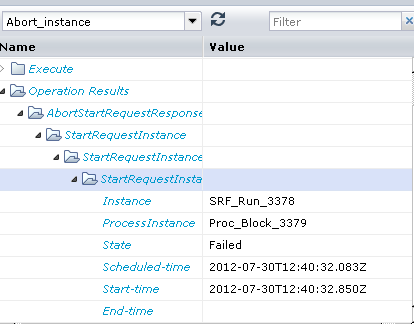
In the following illustration, the output parameters display the current state of the start request form as Failed because the Running state was ended.
Note: You can only end the running start request form instance.
|
Copyright © 2014 CA.
All rights reserved.
|
|