

As an administrator, you want internal CA CloudMinder Identity Management users, such as employees or partners, to have easy but secure access to software resources outside of your network environment.
For example, Salesforce.com is a software resource outside of your network environment. You want all new sales employees in your company to have access to Salesforce. You want that access to be protected by security more advanced than the security provided by Salesforce. You want to set up Salesforce accounts for employees automatically, rather than creating them one-by-one. You also want your employees to be able to access Salesforce through single sign-on for enhanced convenience and security.
This scenario describes how to use CA CloudMinder to perform all of these activities:
This scenario assumes that you have purchased the Single Sign-on Service, the Advanced Authentication Service, and the Provisioning Service for your CA CloudMinder environment.
Note: The terminology used for the target software resource is different depending on the component you are configuring. Note the following:
The following figure shows the steps required to configure this scenario. In a typical environment, hosting administrators and tenant administrators have access to different system components and features. In this scenario, a hosting administrator performs some steps while a tenant administrator performs other steps.
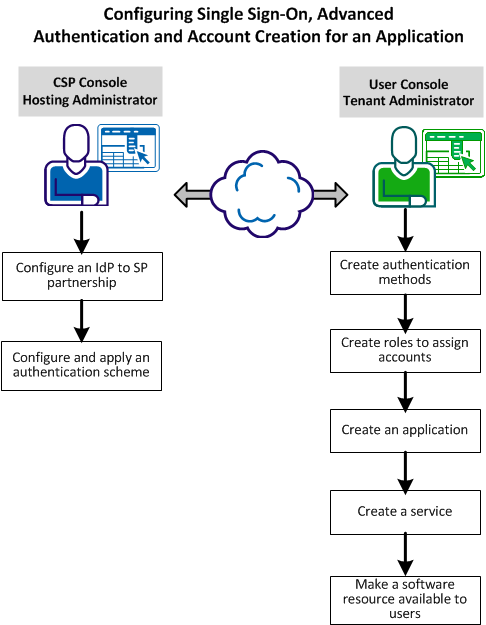
Perform the following procedures to configure an application for SSO, advanced authentication, and account creation. (The responsible administrator is indicated in parenthesis.)
Create federated partnerships to enable secure communication between your CA CloudMinder system and the target software resource.
Configure and apply an authentication scheme to make a given type of login security available in your system. The authentication method and authentication scheme work together to protect access to the specified application.
Create authentication methods to make a given type of login security available to apply to an application. The authentication method and authentication scheme work together to protect access to the specified application.
Create one or more account templates and provisioning roles to automatically create user accounts in the target software resource.
Create an application to define how and where users access the target software resource.
Create a service to give the user access to the application. The application is now configured with single sign-on, advanced authentication and automatic account creation.
Make the resource available through the User Console, or through a URL link.
|
Copyright © 2014 CA.
All rights reserved.
|
|