

As an administrator, you want to give your users secure and convenient access to software resources. For example, your users need access to your email system, which can be hosted on-premise by your organization. Users also need access to Salesforce.com, which an external organization hosts in the cloud.
Note: Although a tenant administrator typically creates applications for their environment, a hosting administrator can also perform this task.
You create an application to define how users access a software resource. For example, when you configure an application, you define what type and level of security protects the resource. If you have purchased CA CloudMinder Advanced Authentication, you can configure advanced security such as two-factor authentication to protect the resource. If you have purchased the CA CloudMinder Single Sign-on service, you can configure SSO for the application. Users only log in once to access all applications that are configured for SSO.
Once an application is configured, you can give users access to the software resource. You can configure a service that includes the application, and can assign the service to users. The users can click the icon in the User Console Home Page to access the application. For more information, see Creating a Service Using the Service Wizard. You can also give users access to the application by making a link to the application available. For example, you can insert the link into any web page or you can send the link in an email.
The following diagram shows the information to understand and the steps to perform to create an application and make it available to users.
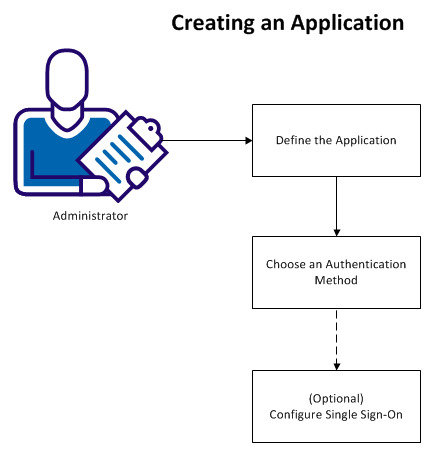
The following topics explain how to create an application:
|
Copyright © 2014 CA.
All rights reserved.
|
|