

This scenario shows how a system administrator includes and indexes documentation in the Knowledge Center. Indexing is a process that reviews your document and creates a record of the content and location of your document. You can also index websites. This record speeds up the search. When you first install CA Chorus, the Knowledge Center is already populated with indexed information for CA Chorus and your back-end products.
Adding your own documentation offers the following benefits:
Important! You may use the Knowledge Center to index content available only on the LPAR where CA Chorus is running. This content is not available when the product switches to a different LPAR. Switching can occur when you have configured the product for High Availability (HA). After the product reverts to the LPAR where the content resides, the content is available.
Important! The Knowledge Center only supports the indexing of UTF-8 (ASCII) file formats. To index an EBCDIC file, create a copy and convert it to UTF-8 format, and then index the UTF-8 copy.
The following illustration describes the steps to add files:
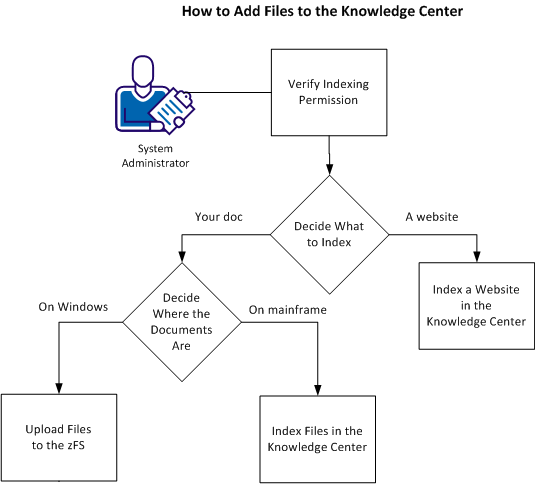
This scenario describes the following steps:
|
Copyright © 2015 CA Technologies.
All rights reserved.
|
|