

The following main roles are identified:
The Dashboard Designer is an administrator user who is familiar with CA Business Service Insight, its terminology and structure.
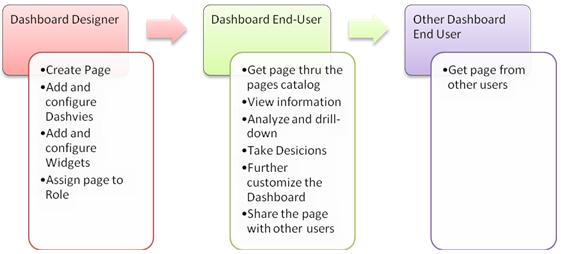
The Dashboard Designer is responsible to define and design dashboard pages and their content, and set up the calculation schemes of the widgets in the page in order to satisfy the needs of the Dashboard End-users.
The Dashboard Designer may create predefined pages for various Roles, User Groups or Users (for more information, see Collaboration). Typically, during system set-up, the Dashboard Designer creates pages and assigns them to the appropriate roles. For example, page for Account Managers, page for Service Managers, etc.
The Dashboard End-user is a business-oriented user who is familiar with business terminology and needs to quickly see the status and health of the service delivery under his responsibility and interest.
Once a Dashboard End-user (with the appropriate security rights) logs into the Dashboard, pages assigned to the user by the Dashboard Designer become available in the pages catalog. The Dashboard End-user can then view his tailored dashboard content in advance. The information presented to the Dashboard End-user is filtered by the contract parties with which he/she is associated. For example, if on the Account Managers page there is a widget that shows the status of the European Contract Party Group (composed of contract parties X, Y and Z), and user A is responsible for contract parties X and Y and user B is responsible for contract party Y and Z, the two users might see a different status of the same widget on the same page. Each of them sees a widget calculated based on the contract parties under their responsibility.
|
Copyright © 2013 CA.
All rights reserved.
|
|