

|
|
|
When no jobs are currently running, the Job Monitor panel displays the date and time of the next scheduled event, with the type of event to be performed.

When a job is running, this panel expands to display information about the ongoing event such as the estimated time remaining to complete the job, the percentage and size of the job already completed, and the total size of the job when completed.

When a job is running, you can click the Detail button to open the Backup Status Monitor and display more detailed information about the current job running. You can also click the Cancel button to stop the current job.
Note: If you want to stop the current job, click the Detail button first, to gain access to the Cancel button.
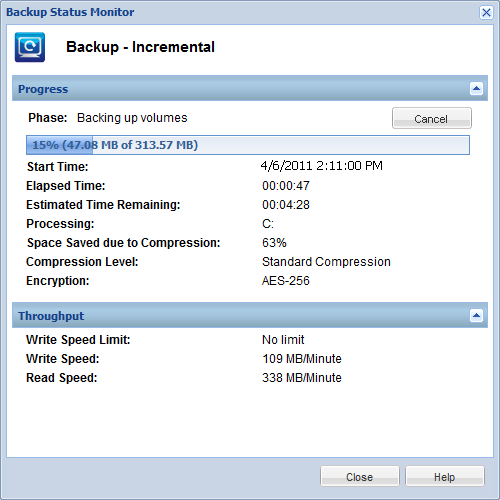
In addition to displaying more detailed information about the current job, the Backup Status Monitor also displays the throughput information for the job (actual Read and Write speed and the configured throttle speed limit).
For more information about adjusting the Throttle Backup speed, see Specify the Protection Settings.
For more information about adjusting the Throttle File Copy speed, see Specify the File Copy Destination.
Note: Any changes made to the throttle settings does not take effect until you launch a new job.
Note: Normally during a Verify backup job, the Read speed is much higher than Write Speed. This is because the block-by-block comparison effort (Read speed) of a Verify backup is the more active and continuous process, and because only the information that does not match the source is backed-up, the Write speed is minimized.
| Copyright © 2012 CA. All rights reserved. | Tell Technical Publications how we can improve this information |