

|
|
|
The Status Summary section of the home page provides a quick and easy, high-level status of your backup health.
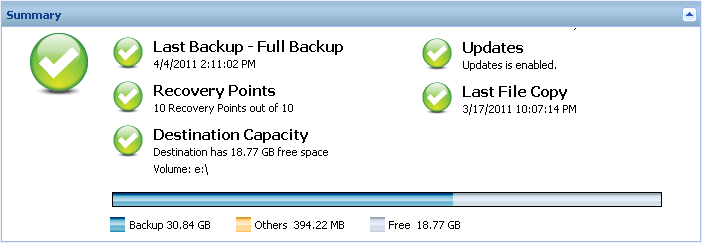
Displays the date and time of the last backup, with the status of that backup.
Displays the number of Recovery Points for your monitored server. You can specify a minimum number of recovery points to maintain a safe recovery environment.
Displays the amount of free space available at your backup destination. The Destination Capacity display provides an additional indication of the amount of space used for the backups, the amount of space used by others, and the amount of available free space.
You should immediately increase the free space capacity of the backup destination or change the destination to another location which has adequate space.
Note: You can set up an email alert notification when the amount of unused space at the backup destination is less than a specified value. For more information about setting up this email alert notification, see Specify Email Alert Preferences.
Displays the status of CA ARCserve D2D On Demand updates for your machine.
You can then click "Click here to install updates" to trigger the installation of the update.
For more information about configuring the Update Schedule, see Specify Updates Preferences
Note: All updates released for CA ARCserve D2D On Demand are cumulative. As a result, each update also includes all previously released updates to help ensure your machine is always up-to-date.
Displays the date and time of the last File Copy job, with the status of the File Copy job that was performed.
In addition, the Last File Copy status indicator also displays the actual amount of space freed on disk by the File Copy job. This space saved calculation is only displayed if you select to move the File Copy to a different location instead of copying the File Copy to as different location. This value is based upon the actual size of the backup that was moved from the machine to the specified destination. A File Copy job that does not move the copy to a different location, does not save any space.
| Copyright © 2012 CA. All rights reserved. | Tell Technical Publications how we can improve this information |