

For CA User Activity Reporting Module, a federation is a network of servers that store, report on, and archive event data. A federation allows you to control how your data is grouped and reviewed in a network. You can configure how your servers relate to one another, and thus how queries are sent from one server to another. In addition, you can turn federated queries on and off for specific queries as needed.
The decision to use a federation is based on a combination of required event volume and your business needs for separating and reporting on log data. CA User Activity Reporting Module supports hierarchical and meshed federations, and configurations that blend the two types. All the CA User Activity Reporting Module servers you want to federate must use the same application instance name in CA EEM. Each CA User Activity Reporting Module server installation automatically registers with the CA EEM server using an application instance name.
You can configure a federation at any time after you install your first CA User Activity Reporting Module server and at least one additional server. However, the best results come from planning your federation before installation. Creating a detailed federation map helps you complete the configuration tasks quickly and accurately.
At the network level, having multiple CA User Activity Reporting Module servers allows you to handle greater event volumes. From a reporting perspective, using a federation allows you to control who can access event data and how much of that data they can see.
In a basic two-server environment, the management server takes the role of a reporting server. The internal CA EEM server on the management CA User Activity Reporting Module server manages federation configurations centrally and globally. (You can change the configuration options from any CA User Activity Reporting Module server in the network.) You configure the collection CA User Activity Reporting Module server as a child of the reporting server, so that queries and reports include the most recent data.
Note: If you have an existing CA EEM server that you plan to use with CA User Activity Reporting Module, configure the CA User Activity Reporting Module servers in the same way. The dedicated, remote CA EEM server stores these configurations.
You can also set local configuration options to override the global configurations, allowing selected CA User Activity Reporting Module servers to perform differently than others. Examples include sending email reports and alerts through a different mail server, or scheduling reports specific to a branch of the network at different times.
Creating a federation map is a useful step in planning and implementing your federation configuration. The larger your network is, the more helpful this map is during the actual configuration tasks. You can use any commercial graphics or drawing program, or you can sketch the map by hand. The more details you can supply in your map, the faster you can complete the configuration.
To create a federation map
For example, if your company has offices on three continents, you may decide to create three hierarchical federations. You may further decide to mesh the hierarchies at a high level, so that senior executives and security management can produce reports that cover the entire network. You should at a minimum federate the basic environment's insert and query CA User Activity Reporting Module servers.
This value is based on the number of devices in your network and the event volume they generate.
This number is based in part on the decisions you take in steps 2 and 3.
If your network has a large number of syslog-based devices and only a few Windows servers, you may decide to allocate one CA User Activity Reporting Module server expressly for Windows event collection. You may need several servers to handle the syslog event traffic. Planning ahead which CA User Activity Reporting Module servers receive which kinds of events makes configuration of the local listeners and services easier.
Include DNS names and IP addresses on your map, if known. You will use the DNS names of the CA User Activity Reporting Module servers to configure the federation relationships between them.
When creating a federation map, consider the types of reports for which you want different sets of consolidated data. For example, consider the scenario where you want consolidated data using three types of server groupings:
For system reports on self-monitoring events, including all servers lets you evaluate the health of your entire CA User Activity Reporting Module network of servers at once.
For summary and trend reports, where you want to examine data collected by all agents that send data to all collection servers while sparing your collection servers from processing queries on new, hot events, you need to run federated reports that include only reporting servers.
For reports where you want data limited to a locale with one reporting server, but you want that report to include the events not yet sent to that server by its collection servers, you need to run federated reports on this subset of servers.
An example federation map that lets you meet these reporting objectives follows:
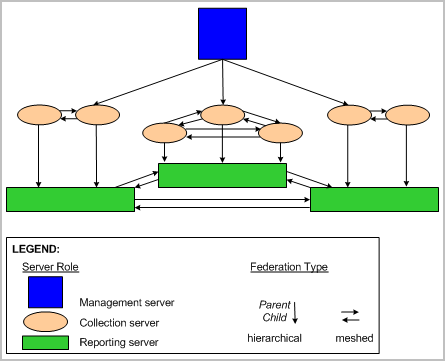
To implement the design of this federation map, you would take the following actions:
To meet a given reporting objective, it is important to run the report from a server represented by a particular location on your federation map. Examples follow:
Before you create a federation map, determine the number of servers you plan to devote to each server role. In the following example, one server is devoted to management and reporting and the remaining servers are devoted to collection. We recommend this configuration for a mid-sized environment. You can think of the architecture of the management/reporting server and collection servers as hub and spoke, where the management/reporting server is the hub. The federation map diagram does not mirror this configuration; instead, it shows the tiers so you can easily differentiate pairs that are federated hierarchically from the meshed ones.
When creating a federation map, consider the reports and alerts for which you want different sets of consolidated data. For example, consider the scenario where you want consolidated data using two types of server groupings:
For most reports, where you want to examine recently archived (warm) events while sparing your collection servers from processing queries on new (hot) events
Note: Events are typically archived from collection servers (spokes) to the reporting server (hub) every hour.
For system reports on self-monitoring events, where you want to evaluate the health of all your CA User Activity Reporting Module servers at once
For alerts, where it is important to query for new events from all collection servers
An example federation map that lets you meet these reporting objectives follows:
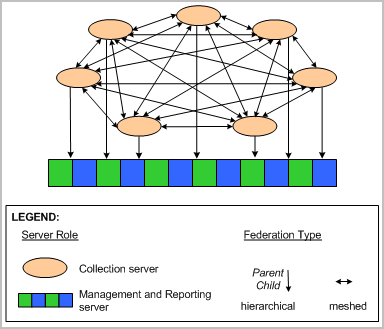
To implement the design of this federation map, you would take the following actions:
To meet a given objective, it is important to run the report or alert from a server represented by a particular location on your federation map and correctly specify whether federation is needed. Examples follow:
|
Copyright © 2014 CA Technologies.
All rights reserved.
|
|