

Log collection planning for your network is based upon the number of events per second (eps) you need to process for storage and the length of time you need to retain the data online. (In this sense, online means in an immediately searchable state.) Typically, you have only 30-90 days' worth of data online.
Each network has its own event volumes as a function of the number of devices, device types, and the degree to which network devices and applications like firewalls are tuned to fit the enterprise's event information needs. For example, some firewalls can generate huge volumes of unneeded events based on how they are configured.
We recommend planning your event collection so that your total event volume is spread evenly across your CA User Activity Reporting Module servers without forcing any of them to go beyond the normal constant duty rating. To maintain peak performance at enterprise event volumes, we recommend that you install at least two, federated CA User Activity Reporting Module servers:
The following illustration shows a simple example of this kind of federated CA User Activity Reporting Module network. Two CA User Activity Reporting Module servers, one for reporting and one for collection, handle event traffic from a variety of event sources. Both servers can share data between them for queries, reporting, and alerting.
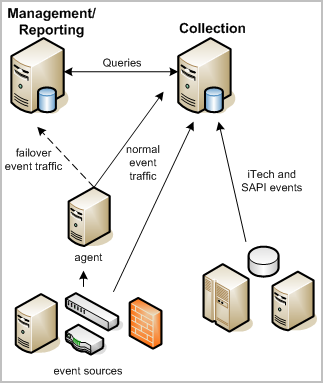
The collection server primarily handles the incoming event log traffic and focuses on database inserts. It uses a short data retention policy of 24 hours or less. An automated script moves stored event logs to a reporting server daily or more often depending on event volume. Federation and the use of federated queries between the two servers ensures that you receive accurate reports from the event logs on both servers.
The reporting server performs several functions:
An automated backup script moves data from the reporting server to a remote server (cold storage). If you decide to restore data from cold storage, you generally will do so on the reporting server. If space on the reporting server is limited, you can also restore to the collection server. Since the collection server does not store large amounts of data and is federated, the report results are the same.
In addition, the reporting server can function as a failover receiver for events collected by a connector on a remote agent, if the collection server stops receiving events for some reason. You can configure failover at the agent level. Failover processing sends events to one or more alternate CA User Activity Reporting Module servers. Failover event collection is not available for events from legacy event sources collected through the SAPI and iTech listeners.
When you plan your environment, ensure that you have sufficient disk space to support high event volumes. For the collection server, this means enough disk space for each collection server to accommodate its share of peak loads as well as standard event volumes. For a reporting server, disk space is calculated based on event volume and the required online retention period.
Hot databases are not compressed. Warm databases are compressed. Both the hot and warm databases are considered to be online. You can search or report on their data. You would typically have at most between 30 and 90 day's worth of data ready for reporting and immediate search at any one time. Records older than that are stored on a remote server. You can restore them for search and reporting as needed.
Collection servers support both hot and warm databases. Since the retention period for a collection server is very short, from one to 23 hours, long term storage is not a factor.
A hot database exists on a management server for inserting self monitoring event messages.
Reporting servers support smaller hot databases and a large number of warm databases. Reporting servers must also have enough additional space to support restored files for some term. When you use direct attached storage, the partitions are automatically extended to allow for greater storage capacity.
CA User Activity Reporting Module uses the CA Embedded Entitlements Manager (CA EEM) server internally to manage configurations, authorize and authenticate users, coordinate subscription updates to content and binaries, and perform other management functions. In the basic CA User Activity Reporting Module environment, you install CA EEM when you install the management CA User Activity Reporting Module server. From there CA EEM manages the configurations of all of the collection CA User Activity Reporting Module servers and their agents and connectors.
You can also choose to install the CA EEM server on a remote server using the supplied install packages on the Application installation disk, or you can use an existing CA EEM server if you have one in use with other CA Technologies products.
The CA EEM server offers its own web interface. However, almost all of your configuration and maintenance activities take place within the CA User Activity Reporting Module user interface. You should not normally need to interact directly with the embedded CA EEM server functions except for failover configurations and the backup and restore functions that are part of disaster recovery.
Note: The CA User Activity Reporting Module server installation requires that you use the password for the CA EEM default administration account, EiamAdmin, for proper registration of a CA User Activity Reporting Module server. When you install the first management CA User Activity Reporting Module server, you create this new password as part of the installation. When you install subsequent CA User Activity Reporting Module servers using the same application instance name, you automatically create a network environment in which you can later set up federation relationships between the CA User Activity Reporting Module servers.
Consider the following log collection guidelines during your planning phase:
When determining whether to use direct collection by the default agent, agent-based collection where the agent is installed on the host with the event source, or agentless collection where the agent is installed on a collection point remote from the event sources, consider these factors:
For example, WMI only works on Windows for the log sensor.
For example, you need an ODBC driver for ODBC to work.
For example, for file-based logs, you need a shared-drive in order for those to work remotely.
|
Copyright © 2014 CA Technologies.
All rights reserved.
|
|