

Navigating the Windows Client Interface › Toolbar › Home View
Home View
When the Windows Client initializes, the Home View appears by default:
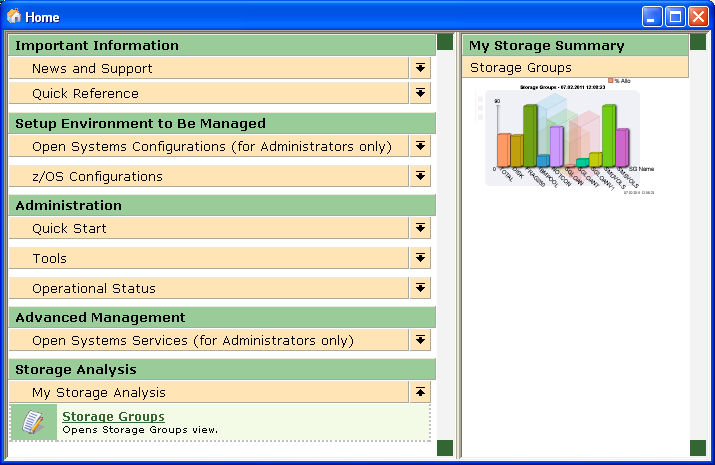
The Home view is a browser-style home page. The page is split into two panes. The left pane contains a full‑featured set of links to most of the Windows Client functions. You can set up the right pane to display graph views and trends of your storage resources.
The Home view left pane contains links to the following Windows Client functions:
- Important Information
- News and Support
- What's new in the Open Systems product - provides a link to the CA SRM technical support web page, that advises what's new in the Open Systems product.
- What's new in the z/OS product - provides a link to the CA Vantage SRM technical support web page, that advises what's new in the CA Vantage SRM product.
- Open Systems Patches and Downloads - provides a link to the CA SRM technical support web page, that provides available patches and downloads for CA SRM.
- CA Vantage Windows Client Patches and Downloads - provides a link to the CA Vantage SRM Windows Client technical support web page, that provides available patches and downloads for the CA Vantage SRM Windows Client.
- CA Vantage Mainframe Service Packs and Downloads - provides a link to the CA Vantage SRM technical support web page, that provides available patches and downloads for the CA Vantage.
- Supported Platforms and Installation Requirements - provides a link to the CA SRM technical support page that advises what platforms CA SRM and the Windows Client support.
- Quick Reference
- Open Systems Readme - informs of updates and information that supplements the online help or the documentation for the Windows Client and CA SRM.
- z/OS Readme - informs of updates and information that supplements the online help or the documentation for CA Vantage SRM.
- Open Systems Release Summary - provides a summary of the new features added and enhancements made to CA SRM.
- z/OS Release Summary - provides a summary of the new features added and enhancements made to CA Vantage SRM.
- Setup Environment to Be Managed
- Open Systems Configurations (for Administrators only)
- Computers and Domains
- Disk Arrays
- NetApp Filers
- Virtual Host Servers
- Virtual Storage Servers
- SAN Fabric
- Backup Servers
- DB2
- Oracle Databases
- SQL Servers
- Sybase Servers
- Exchange Servers
- Lotus Domino
- Defined Applications
- LDAP Server
- Organization
- z/OS Configurations
- Host Configuration Client - launches the z/OS Config Client where you can configure the z/OS Host parameters.
- Administration
- Quick Start
- User Manager
- Host List
- Object Tree
- Tools
- Options
- Start Scheduler
- Stop Scheduler
- Schedule List
- Export
- Import
- Operational Status
- Global Log Report
- Error Log Report
- Activity Today
- Activity Monitor
- Advanced Management Configuration
- Open Systems Services (for Administrators only)
- Automate (Service Builder)
- Class (Builder)
- File Groups (Service Builder)
- Query (Builder)
- TSM Message Scanner
- Backup (Service Builder)
- Storage Analysis
- My Storage Analysis - displays a factory supplied list of links to object views that are initially provided. You can customize this list using the My Storage Analysis - Objects and Views page of the Windows Client Options wizard.
- My Storage Summaries - displays graph views and trends of your storage resources
Observer the following:
Copyright © 2013 CA.
All rights reserved.
|
|