

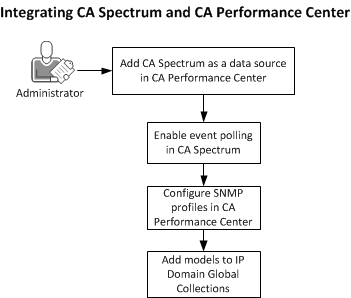
The following diagram shows the major steps that are required to configure the CA Spectrum and CA Performance Center integration:
If you plan to have Data Aggregator discover the devices that CA Spectrum contributes (the optional Step 5, below), register the Data Aggregator data source first, and enable the option to Discover Devices from other Data Sources. Data Collectors must also be installed for each IP Domain to which CA Spectrum will contribute device models.
Follow these steps:
The optional step to enable discovery synchronization involves some configuration in CA Performance Center and in the Data Aggregator component.
Note: After the integration, if you cannot view the CA Performance Center events in CA Spectrum, check whether any firewall settings block the communication between CA Performance Center and CA Spectrum OneClick server.
|
Copyright © 2014 CA.
All rights reserved.
|
|