

Introduction: How to Integrate CA Spectrum® and CA Performance Center › How to Integrate CA Spectrum and CA Performance Center › Configure CA Spectrum as a Data Source in CA Performance Center
Configure CA Spectrum as a Data Source in CA Performance Center
Add CA Spectrum as a data source in CA Performance Center so that these components can share information.
Follow these steps:
- Launch the CA Performance Center console and click Admin, Data Sources.
The Manage Data Sources page opens.
- Click Add.
The Add Data Source dialog opens.
- Select 'Spectrum Infrastructure Manager' in the Source Type field.
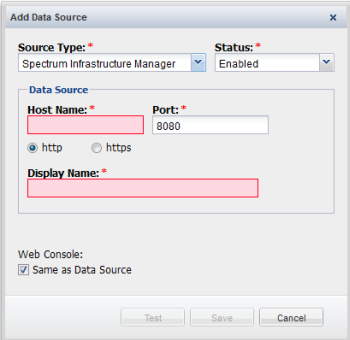
- Complete the following fields:
- Status. Select Enabled in the Status field.
Tip: You can select Disabled to disable the data source without deleting it.
- Host Name. Provide the IP address or DNS host name of the OneClick server.
- Port. Provide the port number to use when contacting the OneClick server.
- Protocol. Select the protocol to use to contact the data source. Select the https option if your network uses SSL for communications. Verify that you have configured the system correctly before you select the https option.
Note: Before you select https, ensure that you have enabled SSL on your OneClick web server host by configuring the "server.xml" and "axis2.xml" file appropriately. For more information about enabling SSL on OneClick web server host, see CA Spectrum Administrator Guide.
- Display Name. Provide a name for the data source. By default, the data source type and the host name are combined to create the display name.
- Same as Data Source. Select the check box if the Web Console is on the OneClick server.
Or clear the Same as Data Source check box if the Web Console is on a different server. Then complete the following fields:
- Host Name. Provide the IP address or DNS host name of the Web Console server.
- Port. Provide the port number to use when contacting the Web Console server.
- Protocol. Select the protocol to use to contact the Web Console server: http or https.
- Click Test to verify that CA Performance Center can contact the OneClick server and the Web Server.
- Click Save.
You have added CA Spectrum as a data source and the synchronization process is initiated.
Copyright © 2014 CA.
All rights reserved.
|
|