

The CA Spectrum and CA Nimsoft integration is performed through the CA Spectrum Southbound Gateway component. The component asserts the alarm against the existing device model or against an auto-created event model of CA Nimsoft Robot. CA Spectrum EventModel is used when a full device model for the network entity does not exist in CA Spectrum. This integration supports multiple alarms types per model, such as Low Disk, Excessive CPU usage, and Traffic Threshold violation.
Note: The CA Spectrum and CA Nimsoft integration currently supports only a single instance of a given alarm.
As an administrator, configure CA Nimsoft to send alert data to CA Spectrum. CA Nimsoft sends the trap data to the host name and port where the SpectroSERVER is running. By default, CA Spectrum uses standard SNMP trap port 162. You can modify the port by changing the snmp_trap_port parameter in the CA Spectrum .vnmrc file that is located in the CA Spectrum directory.
The following diagram illustrates the process to integrate CA Nimsoft and CA Spectrum through the Southbound Gateway:
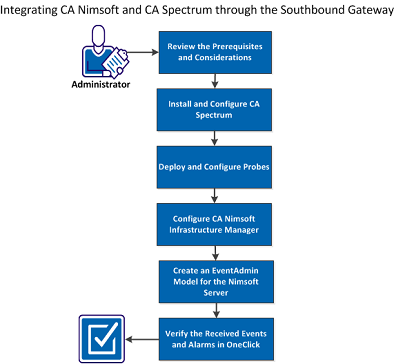
Perform the following tasks to integrate CA Nimsoft and CA Spectrum through the Southbound Gateway:
|
Copyright © 2014 CA.
All rights reserved.
|
|