

The CA Spectrum EventAdmin model receives events from the Southbound Gateway and transfers the event data to EventModels or device models depending on how the integration is configured. Alarms can be created from this event data.
The EventModel is a model type that represents a unique source of event data on the system that is managed by the EventAdmin application. A given EventAdmin model can contain one or many instantiated EventModels. Each event that is received through the Southbound Gateway contains information that uniquely identifies the source of that event. The EventAdmin model receives the event, finds the unique event source, and passes the event to the target destination. Create an EventAdmin model for the Nimsoft server to support the integration.
Follow these steps:
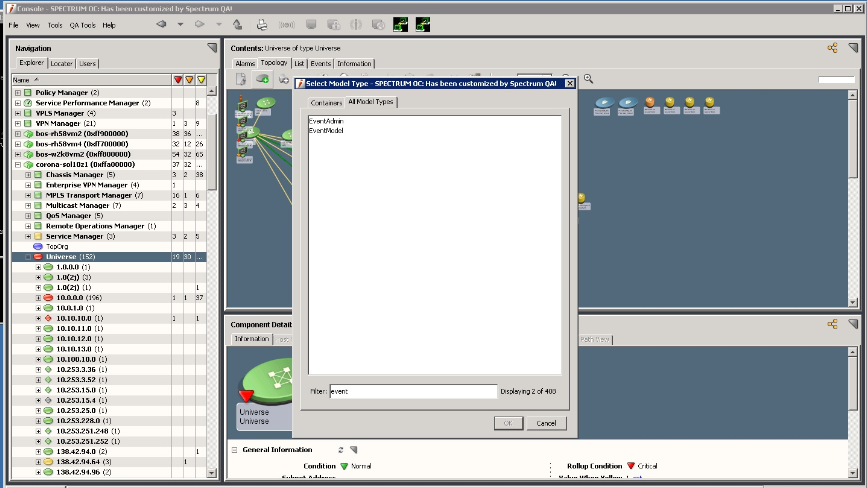
The Select Model Type dialog opens.
The following image displays the model types to be created:
The Create Model of Type EventAdmin dialog opens.
(Optional) Defines the EventAdmin model name. This model name appears in the field at the top of the EventAdmin icon.
Specifies the network address of the event source host computer. Required for all integrations that are based on the SNMP traps.
(Optional) Defines who can view and edit this model.
When this attribute is set on the EventAdmin model, all EventModels contained within this EventAdmin also have this attribute.
Verifies the naming prefix for all EventModels that are associated with a particular EventAdmin model. This field is related to the EventModel Name for all the EventModels contained by this EventAdmin. It is also useful for sorting and filtering.
Default: 0x06330000
The EventAdmin model is generated. A default EventModel is also created and is contained in the EventAdmin model. This model is used for fault tolerance functionality that represents the unique source.
|
Copyright © 2014 CA.
All rights reserved.
|
|