

CA Nimsoft Probes are small, dedicated applications that monitor specific resources or events. Each probe can be easily configured for your specific monitoring requirements.
The SNMP Gateway probe sends traps from CA Nimsoft to CA Spectrum. To integrate CA Nimsoft with CA Spectrum, configure the SNMP Gateway probe (snmpgtw) through CA Nimsoft Infrastructure Manager.
The SNMP gateway converts alarms to SNMP trap messages that are readable by any SNMP-based event manager. The SNMP gateway maps the various severity levels to enterprise-specific trap types. For more information, see http://docs.nimsoft.com/prodhelp/en_US/Probes/GettingStarted/.
Follow these steps:
A list of predefined probes is displayed.
A View Distribution Progress dialog opens.
The probe is deployed to the specified location.
The Probe Configuration window opens.
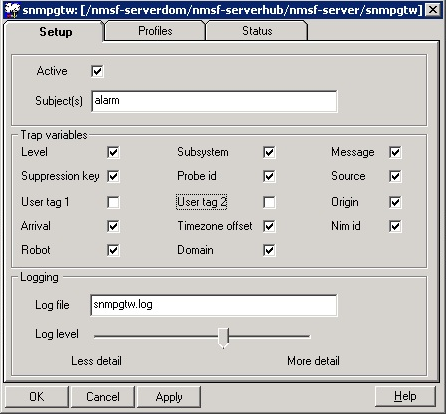
The Setup window opens with the following options:
Activates or deactivates this probe.
Specifies the Nimsoft subject that is transformed. Subject is a text string, that classifies the Nimsoft message for all components of CA Nimsoft.
Default: Alarm
Indicates a unique identifier of the SNMP operation where the traps are triggered.
Specifies the file where the probe logs information about its internal activity.
Sets the level of details for the data that is written to the log-file. We recommend logging as little data as possible during normal operation to minimize disk consumption. You can then increase the amount of detail when debugging.
The following image illustrates the options that are available in the Setup window:
The Profile window opens. For more information, see Configure CA Nimsoft Infrastructure Manager.
The snmpgtw probe is deployed and configured.
|
Copyright © 2014 CA.
All rights reserved.
|
|