

The CA Nimsoft Infrastructure Manager is the primary interface for configuration and management of the CA Nimsoft system.
Configure CA Nimsoft Monitor to manage entities on your network through CA Nimsoft Infrastructure Manager or the Unified Management Portal. To integrate CA Nimsoft with CA Spectrum, configure the SNMP Gateway probe (snmpgtw) through CA Nimsoft Infrastructure Manager. For more information, see Deploy and Configure Probes.
A profile is created in the SNMP Gateway Probe to communicate to the CA Nimsoft Monitor about the traps to send, the conditions under which to send them, and where to send them.
Follow these steps:
A list of Probes is displayed.
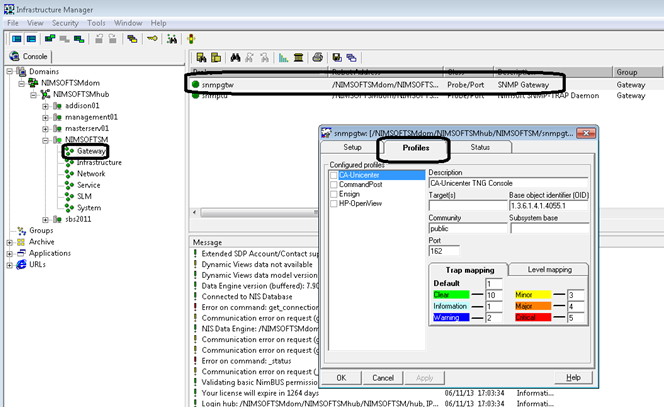
The following image displays the navigation to snmpgtw probe:
The Probe Configuration window opens.
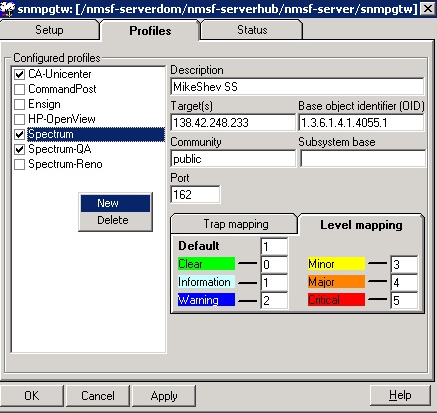
The following image the illustrates the procedure to create a new profile:
The following image illustrates the options that are available in the Profiles window.
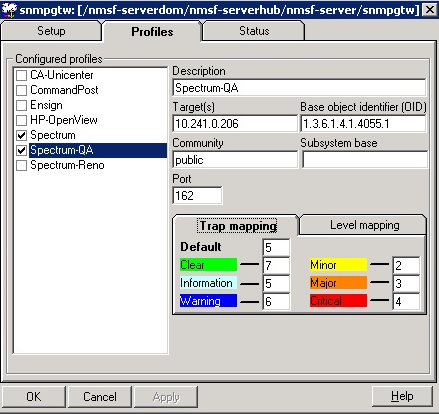
Specifies the SpectroSERVER IP address. Indicates the network node where the SNMP traps can be sent.
Indicates the SNMP Object identifier to be used in the trap packages generated.
Default: 1.3.6.1.4.1.4055.1
Indicates the SNMP community string that is used in the SNMP traps.
Classifies the incoming traps by trap type and takes different actions for different trap types. You can map the severity levels of the alerts to SNMP traps.
For example, provide the following values for trap mapping:
Default: 5
Note: If you want to disable informational and warning messages at the source level, remove the mappings for Default, Warning, and Informational in Trap Mapping. For more information, see Performance Considerations.
Identifies the severity levels with different codes. You can map the Nimsoft severity levels to the corresponding level in the receiving system by specifying the correct code.
For example, provide the following values for level mapping:
Default: 1
CA Nimsoft Infrastructure Manager is configured to integrate CA Nimsoft with CA Spectrum.
|
Copyright © 2014 CA.
All rights reserved.
|
|