

Working with CA Catalyst Synchronization › How to Enable CA SOI Service Synchronization
How to Enable CA SOI Service Synchronization
As an administrator, you can synchronization all CI types and relationships from CA SOI to the following products and releases:
- CA CMDB r12.5
- BMC Atrium r7.6.00
When a change to a service model (including adding or updating a CI) occurs, connectors supporting the use case invoke the change in their domain manager. Therefore, the services are synchronized across your enterprise.
Note: When enabling service synchronization, only relationships can be deleted.
The default reconciliation formula is LastUpdateWinsFormula.
Use this scenario to guide you through the process:
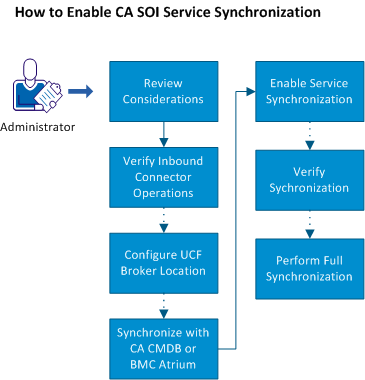
- Review the considerations.
- Verify that inbound to connector operations are enabled on all connectors that you want to participate in the use case.
- (Optional) Configure the UCF Broker location if it uses a different server or port number than the default.
- (Optional) Synchronize CA SOI with all service models in CA CMDB or BMC Atrium.
- Enable CA SOI service synchronization and configure reconciliation formulas.
- (Optional) Verify the synchronization.
- (Optional) Perform a full synchronization.
Copyright © 2013 CA.
All rights reserved.
|
|