

Use this page to perform reporting tasks. These include:
|
Item: |
Description: |
|---|---|
|
|
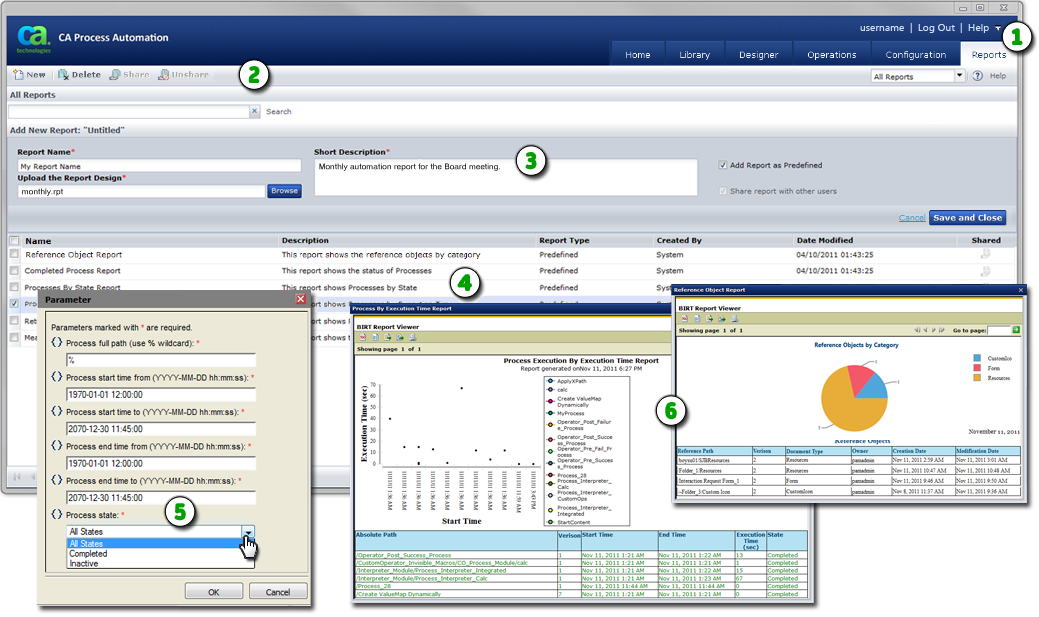
Reports Tab: Click the Reports tab to view or create reports. |
|
|
Reports Toolbar: Use this toolbar to work with the Reports page. A separate standard toolbar is also available for working with report output. |
|
|
Add New Report Area: If you click New in the toolbar, this area appears so you can define and save report details. |
|
|
Reports List: Lists available reports. |
|
|
Parameter Dialog: With the exception of the Reference Object Report, when you click a report in the list, this dialog appears. Use it to define the range of data to include in the selected instance of the report. In this example, the user has selected All States from the { } Process State field. |
|
|
Report Output: Once you click OK, an on-screen preview of the output appears on the Parameter dialog. You can use this output as is, print it to another device, or export it for use in another application. |
Note: To design new reports, install the BIRT designer on a separate application server and connect it to the reporting database.
|
Copyright © 2014 CA.
All rights reserved.
|
|


