

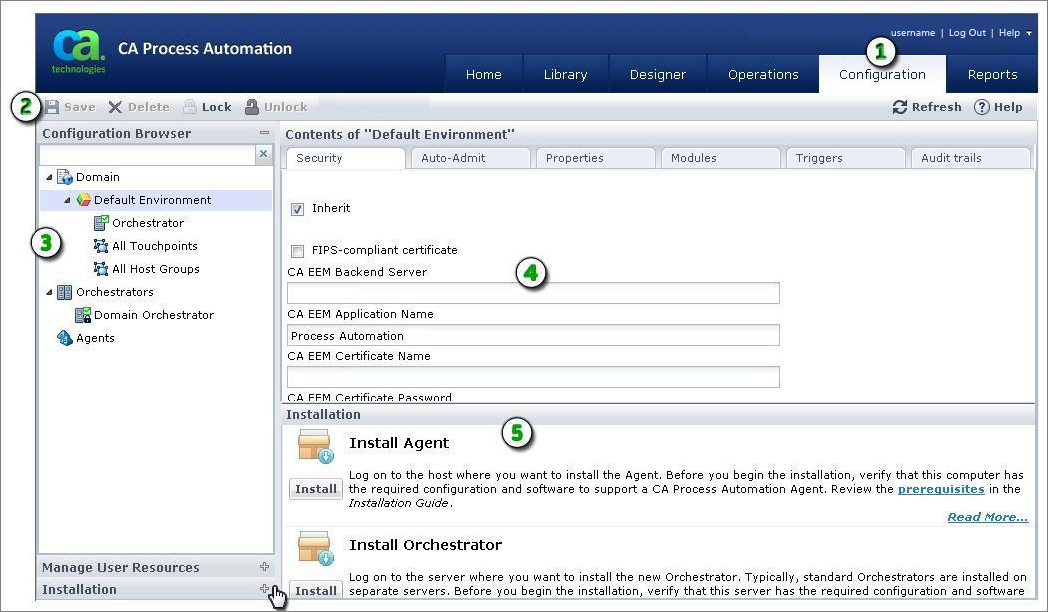
The Configuration Browser palette displays the logical hierarchy of the Domain. Administrators use the Configuration tab to install and configure multiple agents and orchestrators. Content designers have read-only access to the Configuration Browser palette on the Configuration tab.
|
Item: |
Description: |
|---|---|
|
|
Configuration Tab: Only administrators can use this tab to update configuration settings. |
|
|
Configuration Toolbar: Only administrators can lock objects in the Configuration Browser, save configuration changes, and unlock the objects. |
|
|
Configuration Browser Domain hierarchy: Only administrators can configure the product. |
|
|
Configuration Browser Main Pane: The main pane displays configuration data. |
|
|
Installation and Manage User Resources: Only administrators can view these palettes. The Installation and Manage User Resources palettes do not appear when content designers click the Configuration tab. |
|
Copyright © 2014 CA.
All rights reserved.
|
|


