

Applies to CA6000 and CA6300 appliances
Perform a Power On Self Test (POST) to assess the hardware status. Use the diagnostic information on the terminal display to help identify hardware issues. Note that the system log, located in /var/log/messages, also logs diagnostic information, however, the terminal display is the most complete source of diagnostic information.
Be sure to resolve any hardware issues before you upgrade CA Multi-Port Monitor.
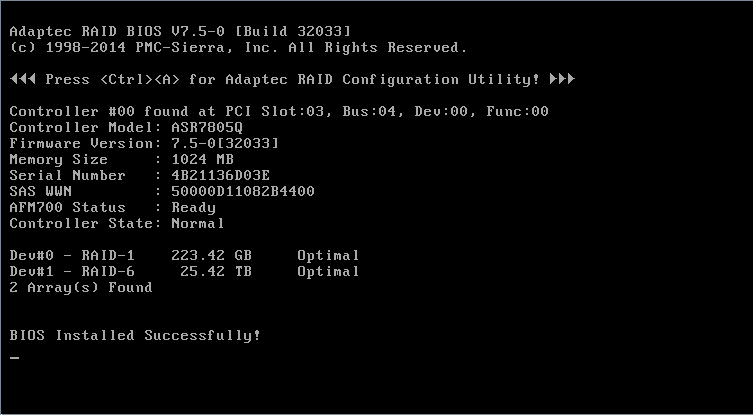
The example below shows the CA6300. The CA6000 will report similar results for each of the two RAID controllers. In this example the status of the single CA6300 RAID controller is optimal, so no further action is required unless failed stripes are present:
On a restart of the appliance:
To restart the CA6000 or CA6300 appliance, follow these steps:
sudo /opt/NetQoS/scripts/doVerticaCmd.sh --shutdown
sudo /sbin/shutdown -r now
For the CA6000, the terminal displays the status of the BIOS scans on the System and Data RAID controllers.
For the CA6300, the terminal displays the status of the BIOS scans on the single RAID controller.
|
Copyright © 2015 CA Technologies.
All rights reserved.
|
|