

An auxiliary record is a non-path record that owns the target record in a set relationship. A target record can have zero or more auxiliary records. Quick Bridge automatically creates an Aux Record tab for each auxiliary record. The auxiliary records that Quick Bridge displays either have a CALC-key or are members of a system-owned indexed set.
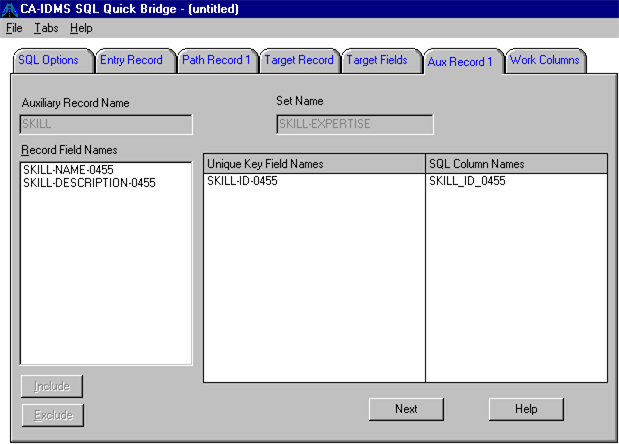
CA IDMS needs an auxiliary record when you issue INSERT and sometimes UPDATE statements. In our example, the auxiliary record is the SKILL record, which is the owner record of the SKILL-EXPERTISE set; the member record of that set is the target record, EXPERTISE.
Auxiliary records also automatically define an alternate entry or key into the database. While the key of the primary path is referenced as KEY 1 in the generated COBOL program, the alternate key corresponding to the first auxiliary record is KEY 2, to the second auxiliary record is KEY 3, and so on.
When a row from the table procedure needs to be selected, the generated COBOL program will first check if values for KEY 1 columns are specified, if so KEY 1 will be used to select the row; next it will check if values for KEY 2 are specified and so on. Only if no values have been specified for any key, will the program use sequential access.
To select a unique key for an auxiliary record
In this example, the target record has one auxiliary record, SKILL, which owns the EXPERTISE record using the SKILL-EXPERTISE set. The unique key field for the SKILL record is its CALC key field, SKILL-ID-0455:
|
Copyright © 2013 CA.
All rights reserved.
|
|