

Creating Table Procedure Specifications › Define a Table Procedure Specification › Add Path Records
Add Path Records
After selecting the entry record for the table procedure, you can add more records to the primary path. The Path Record tab is very similar to the Entry Record tab except that it also includes the name of the set that defines the relationship of the path record to the preceding record on the path.
To add a record to the primary path
- Select a record from the drop-down list box.
- Select the set relationship that you want to use to access the new path record.
- Optionally, select the fields that define a unique key for the record. Click Include to include the selected field names. Each field name appears under the Unique Key Field Name column along side an SQL column name, which you can change to anything you like. For information about SQL column naming conventions and editing, see Editing SQL Column Names.
- Click Next to add more records to the primary path or Target if the path record is also the target record of the table procedure. You can also remove a path record by clicking Remove.
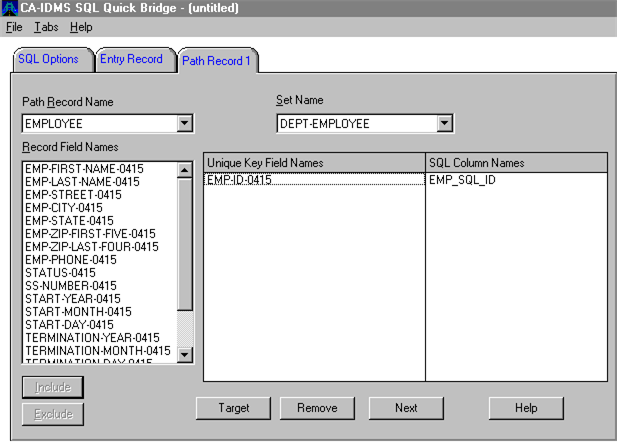
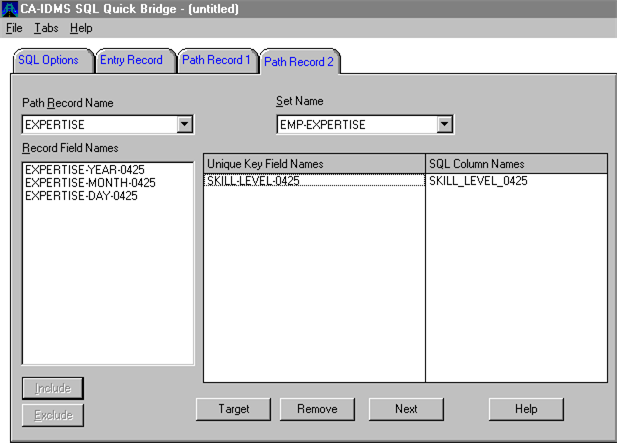
The screens following add the EMPLOYEE record and then the EXPERTISE record to the primary path of the EMPEXPT table procedure specification:
- The EMP-ID-0415 field is the CALC-key field for the EMPLOYEE record, so it is selected as the unique key field.
- The access mode for the EXPERTISE record is via the EMP-EXPERTISE set, which is owned by the EMPLOYEE record. The EXPERTISE record is the member record, which is sorted by skill level, so the SKILL-LEVEL-0425 field is selected as the unique key field.
EMP-ID-0415 is the CALC key for the employee record, the second record in the primary path:
SKILL-LEVEL-0425 is the field used to sort EXPERTISE records owned by EMPLOYEE records. Expertise is the third record in the primary path and also the target:
Copyright © 2013 CA.
All rights reserved.
|
|