

The General Preference settings for editors affect the general appearance and behavior of the PAD Code View editors.
Follow these steps:
The Preferences dialog appears.
The Editors Preference page appears.
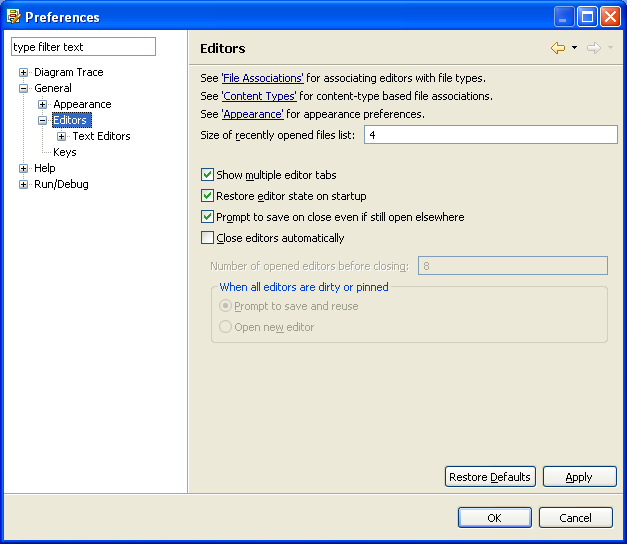
Controls the number of files displayed in the File menu.
Default: 4
Limits: 0 to 15
Display of multiple PAD Code View editor tabs.
Default: On
Note: When this option is Off, editor workbooks have one large tab and all PAD Code View editors that are not visible are available only from the drop-down menu.
Indicates if open editors will be restored when starting up DTU.
Default: On
Default: On
Disables reusing editors in the Diagram Trace Utility.
Default: Off
Displays the number of PAD Code View editors you can use before recycling.
Default: 8
Note: This option is enabled when you select Close editors automatically.
Prompts a dialog to save and reuse editors or opens a new PAD Code View editor when all editors are dirty or pinned. If turned on, the Pin editor action is added to the PAD Code View editor toolbar and editor tab menu.
Default: Prompt to save and reuse
Note: This option is enabled when you select Close editors automatically.
The Diagram Trace Utility saves the new settings and closes the dialog.
Note: The Diagram Trace Utility does not support use of the 'Prompt to save on close even if still open elsewhere' field.
|
Copyright © 2013 CA.
All rights reserved.
|
|