

Using the Eventlist Interface › What the Eventlist Interface Looks Like
What the Eventlist Interface Looks Like
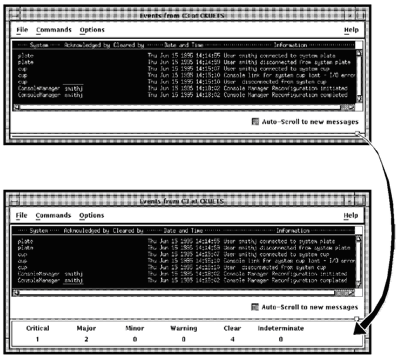
The Eventlist window lists the events generated by Console Manager and the serviced systems that you are managing. The events are displayed as they happen, with one line for each event. The lines are colored according to the priority of the event.
The following figure shows the Eventlist window, which contains:
- A list of the events received so far.
- An Auto-Scroll to new messages option.
- Four pull down menus across the top of the window:
- File - lets you connect to ENS, disconnect from ENS, restart the Eventlist window, and exit Eventlist. The connect and disconnect options are available only when Eventlist is started interactively.
- Commands - lets you manipulate the events displayed in the window.
- Options - lets you customize the appearance of the Eventlist window, change the way Eventlist works, filter out various events, and save your changes. The filter option is available only when Eventlist is started interactively.
- Help - lets you get online help.
It also includes the distribution of event priorities for the events currently in the list (see the lower view in the following figure).
Copyright © 2010 CA.
All rights reserved.
|
|