

The first time you start the C3 interface the main window is displayed, as shown in the following figure.
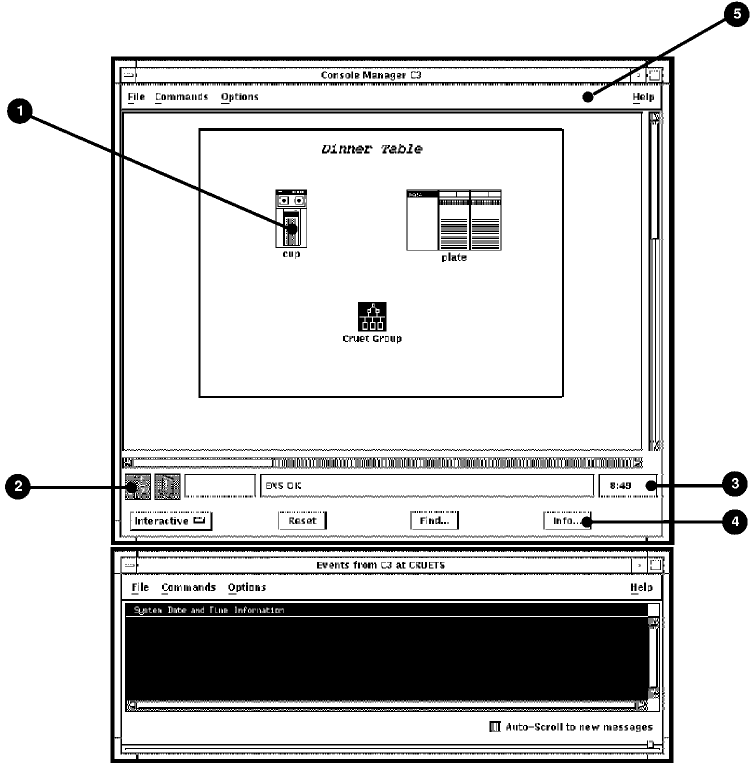
You can customize this display if you wish. See Chapter 9, “Customizing Console Manager,” for more information.
The previous figure also shows an Eventlist window, which can be started automatically when you start the C3 interface. This eventlist displays events for those systems that you have access to in the configuration database. If you do not want to display the Eventlist window, customize the C3 display accordingly. See the chapter Using the Eventlist Interface for more information on using the Eventlist interface.
Note: If ENS is not running when the C3 interface starts up, the Eventlist window does not appear even if you have chosen to have it start up automatically when starting the C3 interface. The window will not appear until ENS is running. See the chapter Supplied Action Routines for detailed information about the eventlist routine.
|
Copyright © 2010 CA.
All rights reserved.
|
|