

The root or system account has all the Console Manager privileges by default. You cannot change this information as there is no entry in the configuration database for this account. If you do create an entry for user root or system, Console Manager will ignore it, and use the default.
Unless a user has an entry in the configuration database, they are not allowed to perform any of the Console Manager functions.
Note: It is important to realize that granting a user privileges to edit the configuration database allows that user to set all other privileges for both themselves and any other user.
Note the following rules regarding usernames:
The username is automatically uppercased by the user interfaces in order to check for a match against the user authorization file entry.
You will need to create security profiles if any of the following apply to your configuration:
To define a security profile
This displays the Security Profile dialog box. You must enter the security profile name here. For example, JSMITHsecure.
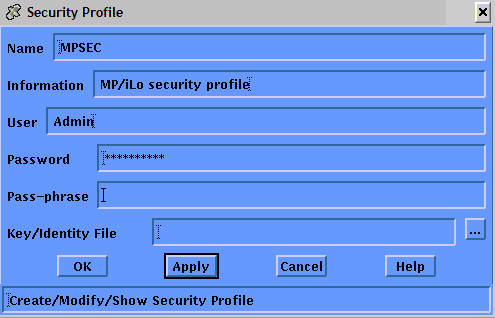
|
Item |
Description |
|---|---|
|
Name |
A unique name for the security profile |
|
Information |
Description to clarify name |
|
User |
User account name |
|
Password |
Password for user account (stored encrypted, displays as all *'s). |
|
Pass-phrase |
Passphrase for the certificate (stored encrypted, displays as all *'s). |
|
Key/Identity file |
Optional. |
|
Copyright © 2010 CA.
All rights reserved.
|
|