

The following table shows the Console Manager characteristics and their default values in your configuration database when Console Manager is installed.
|
Characteristic |
Description |
Default Value |
|---|---|---|
|
Timeout |
The period in seconds that ENS, if enabled, waits for an action before declaring it inoperative. |
60 |
|
Failover |
The secondary host's polling frequency of the primary host and the number of seconds after which poll requests time out if they do not receive a response. There are two parameters: |
|
|
|
Failover Keepalive Timer (seconds) |
120 |
|
|
Failover Polling Timer (seconds) |
60 |
|
File space |
The disk space thresholds at which a warning message is issued and an automatic archive is initiated, and the frequency at which the space checks are made. The thresholds indicate the amount of disk space used. There are three parameters: |
|
|
|
Filespace Warning Threshold (%) |
75.0 |
|
|
Filespace Critical Threshold (%) |
90.0 |
|
|
Filespace Check Timer (seconds) |
600
|
|
Archiving |
The period to archive, and the location of the archive files. The two parameters are: |
|
|
|
Number of hours to archive |
12 |
|
|
Archive directory: |
CONSOLE$ |
These defaults should be correct for your environment when you set up Console Manager for the first time. You may change them at any time to suit your requirements.
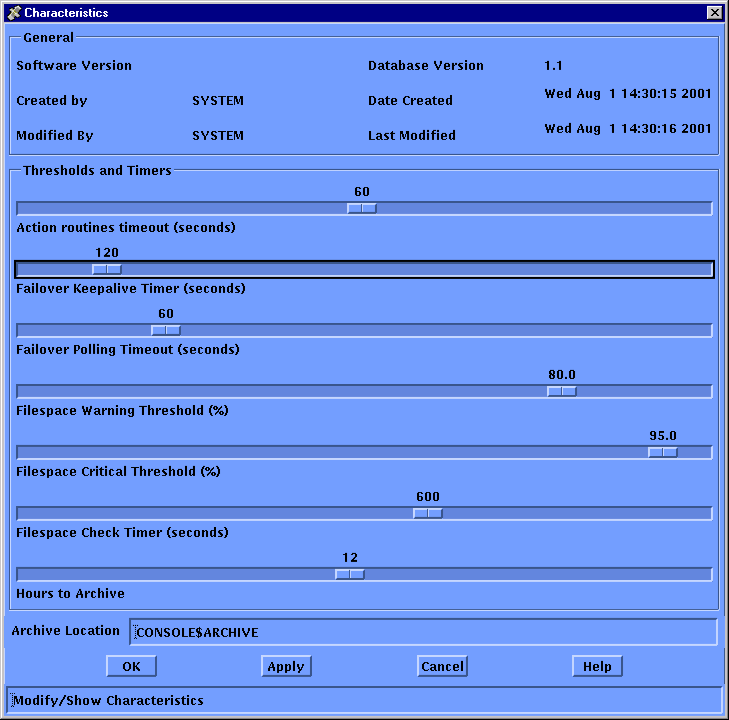
To change a characteristic, click the appropriate box or drag the slider bar. Sometimes you may need to type in the appropriate information in the space provided. To do this, click the space provided and then enter your information. When you have finished, confirm your choices by clicking on OK.
Note: The default values for Console Manager characteristics will be correct for most environments.
The following sections explain the Characteristics dialog box in more detail.
|
Copyright © 2010 CA.
All rights reserved.
|
|