

To add a serviced system:
Note: The name cannot contain any spaces or tabs. For systems using pseudo-terminals, the system name must be unique in the first 15 characters.
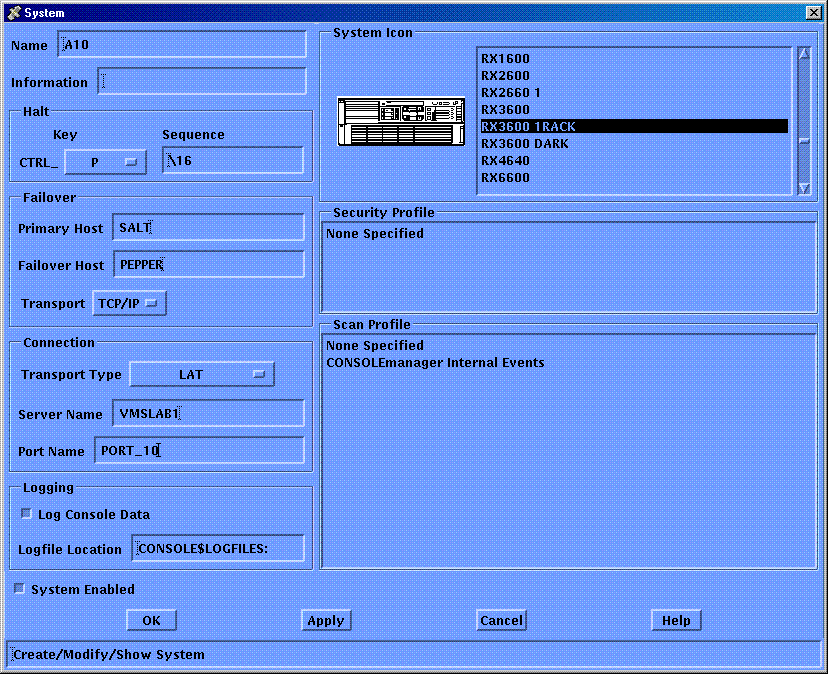
Complete the fields in the dialog box using the following table to help you.
The halt key is a single control key, for example CTRL_P. This is the default key the user will enter to halt the system. The halt key is also a user preference that may be set when using the MONITOR, CONNECT or C3 interfaces.
The halt sequence can be up to eight ASCII characters. These are the actual characters that will be sent to halt the system. To generate a break signal, enter the reserved keyword BREAK.
Note: The halt sequence field may accept more than 8 ASCII characters, however only the first 8 characters will be recognized.
The following table explains what to enter in the fields on the System dialog box.
|
Item |
Description |
|
|---|---|---|
|
Name1 |
A unique name for the system |
|
|
Information |
A description of the system |
|
|
Halt Key |
The default key to enter to halt the system |
|
|
Halt Sequence |
The sequence of characters to be transmitted to halt the system, or BREAK to transmit a break signal. |
|
|
Failover |
The names of the primary and failover hosts |
|
|
Connection |
The physical connection attributes (see the table in the section, Setting Console Manager Characteristics, earlier in this chapter.) |
|
|
Log Console Data |
Indicates whether to log incoming data to disk |
|
|
Logfile Location |
Where logging is required, this specifies the directory in which to place the log files for this system |
|
|
System Enabled |
Indicates whether or not to allow the daemon to manage the console |
|
|
System Icon |
The iconic representation of CM when displaying the DECwindows Motif interface |
|
|
Scan Profile |
The event or set of events for which to scan the console data (see Chapter 10, “Understanding ENS”) |
|
|
1There is no restriction on the length of a system name, but you cannot use spaces as part of the name. Names can be of mixed case, but you cannot have two systems with the same name, even if the case is mixed. You cannot use the keyword ALL or CONSOLEMANAGER as a name for a serviced system. |
|
|
The following table expands on the Connection attribute shown in the previous table. It shows you which fields to complete for the Direct, LAT, TELNET and Pseudo-terminal transport types.
|
|
|
Required For Transport Type |
||||
|---|---|---|---|---|---|---|
|
Connection Attribute |
Meaning |
Direct |
LAT |
TELNET |
Pseudo |
SSH |
|
Command |
The program whose output is being monitored |
N |
N |
N |
Y |
N |
|
Speed |
The baud rate for the connection between the host and the console of the serviced system |
Y |
N |
N |
N |
N |
|
Server Name |
The LAT or TCP/IP name for the remote terminal or console server used to connect to the console of the serviced system |
N |
Y |
Y |
N |
Y |
|
Port Name |
The LAT port name on the remote terminal or console server to which the console of the serviced system is connected |
N |
Y |
N |
N |
N |
|
Listener Number |
The TCP listener port number on the remote terminal or console server |
N |
N |
Y |
N |
Y |
|
Copyright © 2010 CA.
All rights reserved.
|
|