

Post Deployment › Change and Update Passwords › Change Password › Change Password from Active Directory › Change CA Nimsoft Monitor Password in the Active Directory
Change CA Nimsoft Monitor Password in the Active Directory
Change the CA Nimsoft Monitor service provider administrator password in the Active Directory.
Follow these steps:
- Log in to the LDAP server.
- Navigate to Active Directory Users and Computers.
- Expand the host server directory.
- Select Users.
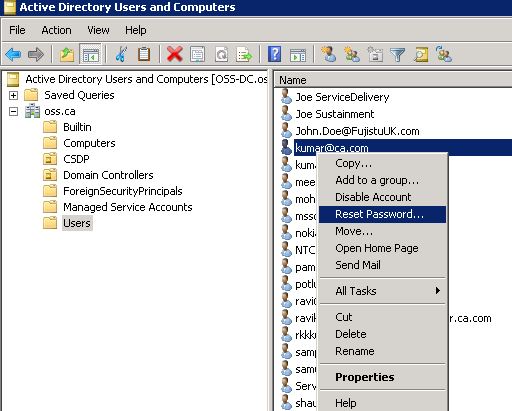
- Locate and right-click the user name whose password you want to update.
- Click Reset Password and update accordingly.
(Active Directory) Update CA Nimsoft Monitor Password in CA Nimsoft Infrastructure Manager
After you change CA Nimsoft Monitor password in the Active Directory, update the password in CA Nimsoft Monitor Infrastructure Manager.
Follow these steps:
- Log in to the system where CA Nimsoft Monitor Infrastructure Manager is installed.
- Click Start, All Programs, Nimsoft Monitoring, Infrastructure Manager.
- Expand the MaaS-Central-Domain, MaaS-Central-Hub.
- Select MaaS-Central-Robot.
- Select hub from the Probes list, right-click and select Configure.
- Click Settings.
- Update the password, click Test.
- Click OK, Apply, Click Yes to restart the system.
The password is updated in CA Nimsoft Infrastructure Manager.
(Active Directory) Update CA Nimsoft Infrastructure Manager Password in CA Process Automation
After you have updated the service provider administrator password in CA Nimsoft Infrastructure Manager, update the password in CA Process Automation.
Follow these steps:
- Log in to CA Process Automation as an administrator.
- Click Library.
- Select the CA_Monitoring_Service 1.1 folder.
Note: If the folders list is too long, type CA_Monitoring_Service 1.1 in the search field under Orchestrator.
- Right-click EntMon_GlobalDataset and select Edit.
EntMon_GlobalDataset content opens in a new window.
- Expand the Nimsoft folder and select NimsoftPassword.
- Update the Value field to change the password and click Save.
Service provider administrator CA Nimsoft Monitor Infrastructure Manager password is updated in CA Process Automation
Copyright © 2014 CA.
All rights reserved.
|
|