

Post Deployment › Configure Email Settings › Configure CA Process Automation Email Settings › Configure Catalog Administrator Email in CA SDM dataset
Configure Catalog Administrator Email in CA SDM dataset
The email configuration process includes setting a value for the administrator email in CA SDM.
Follow these steps:
- Log in to the CA Process Automation with administrator credentials.
- Click Library, CA SDM to display the contents.
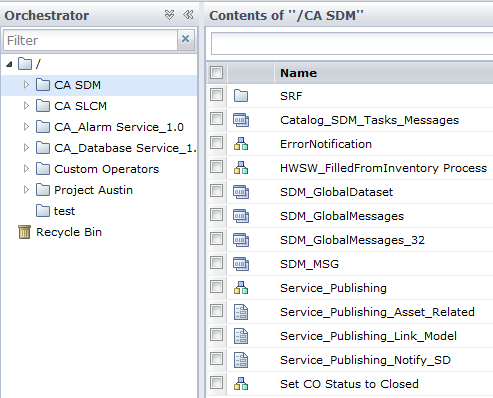
- Double-click SDM_GlobalDataset.
- Click Check Out.
- Expand the Parameters folder.
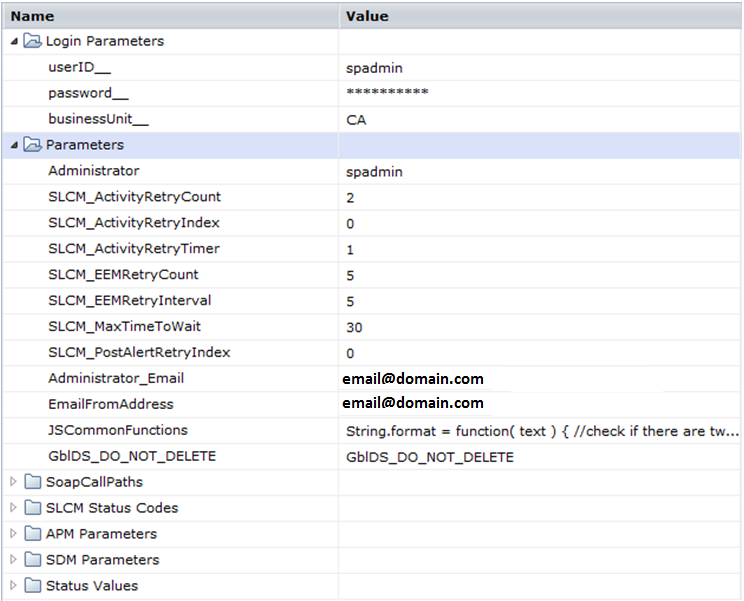
- Provide the email address for Administrator_Email, and EmailFromAddress for catalog administrator.
- Click Save and Close, Check In.
You have configured the administrator email addresses.
Copyright © 2014 CA.
All rights reserved.
|
|