

Post Deployment › Configure Email Settings › Configure CA Process Automation Email Settings
Configure CA Process Automation Email Settings
Configuring the email settings in CA Process Automation is part of the implementation and deployment process.
Follow these steps:
- Log in to the CA Process Automation with administrator credentials.
- Click Configuration, Domain, and Lock.
A page opens displaying the domain settings.
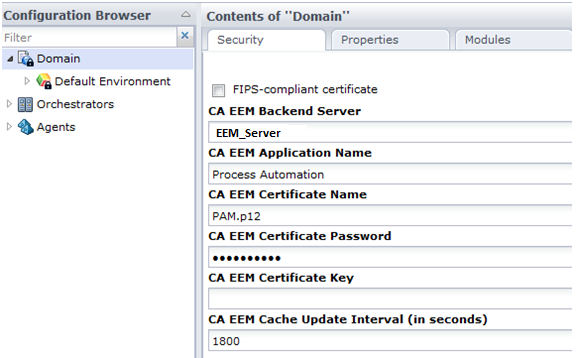
- Click the Modules tab.
- Double-click Email from the Name list.
The Default Email Properties page opens.
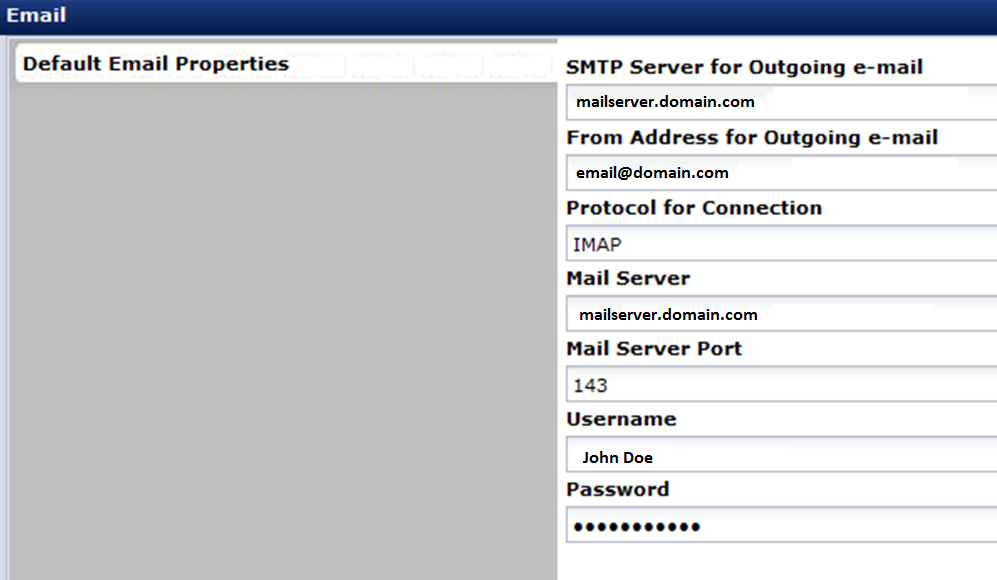
- Provide the details in the Default Email Properties page.
Note: Change the Mail Server port as per your set-up environment.
- Click Save and Close.
- Click Unlock.
- To save the changes, click Yes on the confirmation message.
Note: Ensure that you see the changes that you made in the Contents of Domain page.
You have configured CA Process Automation email.
Copyright © 2014 CA.
All rights reserved.
|
|