

A check box tree lists product components in a hierarchical structure. A sample check box tree is shown in the following screenshot:
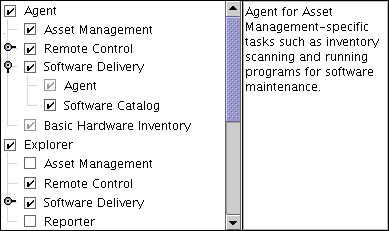
When a component is selected, all sub-components are automatically selected. Required components are also selected, if the referring component is selected.
The component list can be parsed using a scroll bar.
Optionally you can define a text area that shows information about the selected component.
Two pairs of keywords let you define a check box tree control:
A tree contains a list of check boxes.
A scroll area contains a list of check box trees or check boxes.
|
Copyright © 2014 CA Technologies.
All rights reserved.
|
|