

Latest version:
|
At a Glance |
|
|
Catalog |
Dynamic |
|
Category |
Application Controller |
|
User volumes |
yes |
|
Min. memory |
224 MB |
|
OS |
Linux |
|
Constraints |
no |
|
Questions/Comments |
|
SLA is an application controller which dynamically scales an application by starting and stopping other appliances within the application in accordance with a user-defined policy. Policy enforcement relies on periodic assessment of counter values accessed through the mtr terminal. The mtr terminal is typically connected to the aux terminal of the MON appliance. SLA tracks the values of a single counter over a group of appliances.
The policy is configurable through a simple web interface (GUI) exposed by SLA. The GUI is accessed using the application IP and the configured SLA port. A policy comprises:
SLA periodically calculates a trailing average for the counter by averaging the counter values of the running appliances in the appliance group over the trailing average period. When the trailing average passes the start value, SLA starts an appliance in the appliance group. When the trailing average passes the stop value, SLA stops an appliance in the appliance group.
SLA is typically used to start and stop individual web servers within the scalable web server appliances WEBx4/WEBx8 in response to HTTP request load.
Important
The SLA appliance is an assembly comprised of an instance of the PS8 port switch and an instance of the SLACTL appliance. The SLACTL appliance is not designed to be used independent of the containing SLA assembly. Use the SLA appliance when designing an application rather than directly using the SLACTL appliance.
Resources
|
Resource |
Minimum |
Maximum |
Default |
|
CPU |
0.1 |
0.1 |
0.1 |
|
Memory |
224 MB |
224 MB |
224 MB |
|
Bandwidth |
1 Mbps |
1 Mbps |
1 Mbps |
Terminals
|
Name |
Direction |
Protocol |
Description |
|
in |
in |
Any |
Exposes a web interface (GUI) for configuring the policy. All other network traffic not directed to the GUI is passed-through aux without modification. |
|
net |
out |
Any |
Output for accessing the grid to facilitate appliance start/stop. |
|
mtr |
out |
Any |
Output for accessing performance and resource data using the MON Data Collection Interface. |
|
log |
out |
CIFS |
Output to a network file system for storing operational logs. If this terminal is unconnected, logs are stored on the config volume. |
|
aux |
out |
Any |
Auxiliary output. Incoming traffic that is not directed to the GUI is sent through this terminal without modification. This terminal can be left unconnected. |
|
mon |
out |
CCE |
Used for performance and resource usage statistics. This terminal can be left unconnected. |
User Volumes
|
Volume |
Description |
|
config |
Read/write volume for configuration data. |
This volume is used to store:
This volume should be 10MB in size. See Preparing for Use for information about setting up a private key on the config volume.
Properties
|
name |
type |
description |
|
appliance_group |
string |
The group of appliances which SLA dynamically starts and stops. This is an appliance name excluding any trailing numbers. For example, a value of main.srv.srv indicates that SLA will start/stop appliances whose names begin with main.srv.srv (that is, main.srv.srv1, main.srv.srv2, and so on.) |
|
grid_ctl_ip |
IP |
IP address of the grid controller on which the application is running. |
|
port_no |
integer |
Port for accessing the web interface. The GUI is accessed through the application IP and this port. Default: 8080. |
|
username |
string |
User name for web-based authentication. If empty, no authentication is performed. Default: empty |
|
password |
string |
Password for web-based authentication. This property is not used if username is empty. Default: empty |
|
logs_base_dir |
string |
Directory where logs are stored. This property has no affect if the log terminal is not connected. Default: / |
Performance
Additional resources do not affect performance.
Error Messages
The following messages may appear in either the appliance log file or the system log of the grid controller when the appliance fails to start:
Interior
The SLA appliance is an assembly comprised of an instance of the PS8 port switch ps and an instance of the SLACTL appliance ctl as shown in the diagram below.
Important: The SLACTL appliance is not designed to be used independent of the containing SLA assembly. Use the SLA appliance when designing an application rather than directly using the SLACTL appliance.
SLA exposes a web interface which is used to define the policy. This GUI is accessed using the application IP on the configured port port_no.
The Commit button commits the policy defined in the GUI for enforcement.
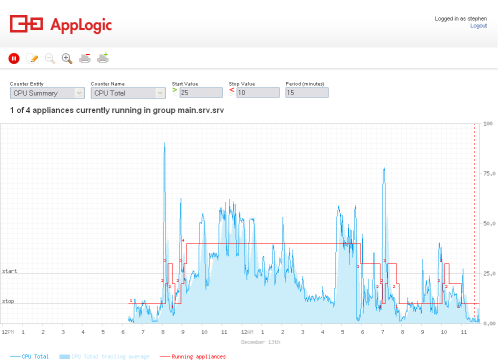
Above is an example of the GUI when a policy is being enforced. The graph shows the last 24 hours of policy enforcement and includes:
The buttons at the top of the GUI are used to:
The following steps must be taken before SLA can be used to dynamically start and stop appliances within an application.SLA must be able to authenticate on the grid controller as a normal user.
To prepare to use SLA in an Application
Start the application in debug mode and copy the grid.private.key in /mnt/config/ folder on the SLA appliance.
LampX4
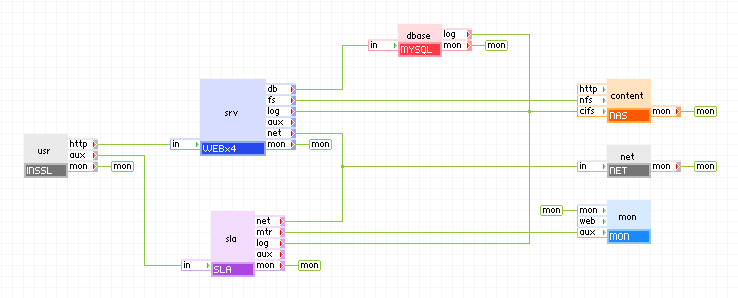
The diagram below shows how SLA can be incorporated in the LampX4 reference application. The INSSLR gateway properties are set to forward tcp traffic on port 8080 to its aux terminal. Pointing a browser at port 8080 of the LampX4 application IP or resolvable domain name brings up the web interface for SLA.
Notes:
The appliance_group property does not resolve to two or more appliances within the application.
Open source and 3rd party software used inside of the appliance
SLA is a compound appliance comprised of PS8 and SLACTL. The base class of SLACTL is WEB5. There are no open source 3rd party software packages installed on SLACTL in addition to those found on its base class WEB5.
|
Copyright © 2011 CA.
All rights reserved.
|
|