

Latest version:
|
At a Glance |
|
|
Catalog |
Dynamic |
|
Category |
Dynamic |
|
User volumes |
yes |
|
Min. memory |
256M |
|
OS |
Linux |
|
Constraints |
no |
|
Questions/Comments |
|
MIG enables the containing application to migrate or snapshot itself to another grid. These operations are initiated through a simple web interface (GUI) exposed by MIG and work in conjunction with the helper application MigHelper. The GUI is accessible through the application IP and the configured MIG port.
Using the GUI, a user can request either of the following operations over the containing application:
Grids involved in these operations must first be configured. See preparing the grids.
Resources
|
Resource |
Minimum |
Maximum |
Default |
|
CPU |
0.10 |
0.10 |
0.10 |
|
Memory |
256 MB |
256 MB |
256 MB |
|
Bandwidth |
2 Mbps |
2 Mbps |
2 Mbps |
Terminals
|
Name |
Direction |
Protocol |
Description |
|
in |
in |
Any |
Exposes a web interface for requesting application migration or snapshot. All other network traffic not directed to the GUI is passed-through aux without modification. |
|
net |
out |
Any |
Output for accessing grids to facilitate application migration or snapshot. |
|
aux |
out |
Any |
Auxiliary output. Incoming traffic that is not directed to the GUI is sent through this terminal without modification. This terminal can be left unconnected. |
|
mon |
out |
CCE |
Used for performance and resource usage statistics. |
User Volumes
|
Volume |
Description |
|
config |
Read/write volume for configuration data. |
The volume is used to store the private_key and grid_info files required for application migration or snapshot.
Properties
|
name |
type |
description |
|
username |
string |
User name for access to the web interface. Default: empty |
|
password |
string |
Password for access to the web interface. Default: empty |
|
mode |
string |
migrate, snapshot or both. Default: both |
|
port_no |
string |
Port for accessing the web interface. This GUI is accessed through the application IP and this port. Default: 8080. |
|
private_key_file |
string |
File containing the openssh formatted private key whose corresponding public key is authorized on the relevant grids. Default: private.key. |
|
grid_info_file |
string |
File containing configuration information for each of the relevant grids. Default: grid.info. |
Performance
Additional resources do not affect performance.
Web Interface (GUI)
MIG exposes a web interface which is used to migrate or snapshot the containing application. This GUI is accessed using the application IP on the configured port.
On the GUI page used for initiating application migration or snapshot, a user selects an operation (migrate or snapshot), a target application name, and a target grid. On Submit, the browser displays the progress monitor.
The progress monitor page contains three monitors:
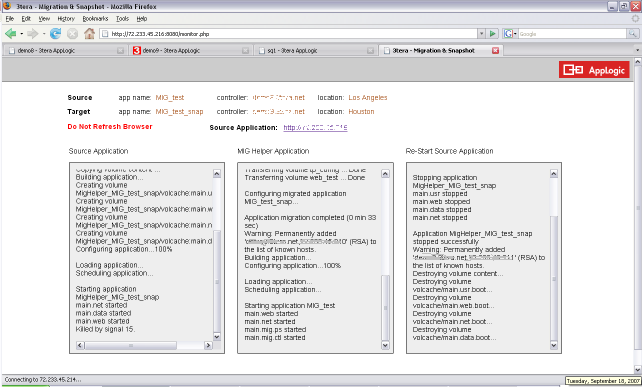
Above is an example of the GUI progress monitor during snapshot. This page contains three monitors:
These steps must be taken before MIG can be used to migrate or snapshot an application. A step-by-step example is provided here.
Preparing The Grids
The MIG appliance must be able to authenticate on any grid to which it will migrate or snapshot. To help ensure this, create a public/private key pair in openssh format without a passphrase. Create a user on each grid whose public key corresponds to the generated public key.
Each grid must be able to authenticate on every other grid involved. To help ensure this, create users on each grid whose public keys correspond to the public keys of the other grids.
Each grid must have installed:
The MIGCTL catalog appliance (this appliance is necessary for MIG).
Preparing The Application
To prepare the application
|
grid g1: |
Indicates that the following information relates to grid "g1" where "g1" is a unique identifier among the grids within this file. |
|
{ |
|
|
controller = w.x.y.z |
IP address for the grid controller or resolvable domain name. |
|
location = Los Angeles |
Location identifier. |
|
MIG_ip = w.x.y.z:8080 |
IP address and port number of the web interface for the MIG appliance on the instance of the application on this grid. |
|
app_config = "in_ip=w.x.y.z out_ip=w.x.y.z ..." |
The quoted string is a list of application properties to be configured for the instance of the application on this grid. Properties not on this list will retain the values from any source instance. Note, do not use .name=new_name. |
|
MigHelper_config = "in_ip=w.x.y.z out_ip=w.x.y.z netmask=w.x.y.z gateway=w.x.y.z" |
The quoted string is a list of all properties used to provision an instance of the MigHelper application on this grid. The MigHelper application requires the netmask and gateway of the grid and two unassigned IP's which are used during migration or snapshot. See MigHelper for more information. |
|
} |
|
Note: The file sample.grid.info located in /var/www/html of the MIG appliance can be used as a template.
Error Messages
The following messages may appear in either the appliance log file or the system log of the grid controller when the appliance fails to start:
LampX4
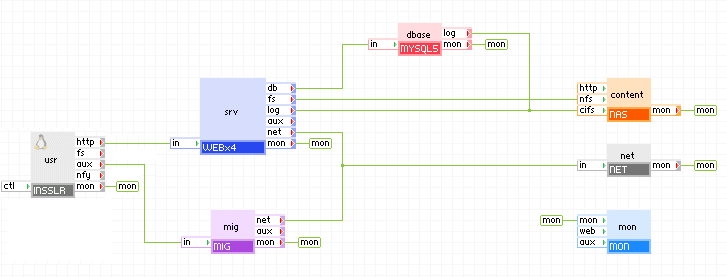
The diagram below shows how MIG can be connected to the LampX4 reference application. The INSSLR gateway properties are set to forward tcp traffic on port 8080 to the aux terminal. Pointing a browser at port 8080 of the application IP or resolvable domain name brings up the web interface for MIG.
Note:
A step-by-step example for setting up the LampX4 use case on two grids is provided here.
It is good practice to set the username and password properties of MIG to prevent unauthorized users from migrating the application.
Note: It is necessary to properly set the start order of MIG. MIG must start after the appliance connected to MIG's net terminal for MIG to identify the grid on which it is running.
Open source and 3rd party software used inside of the appliance
MIG is a compound appliance comprised of PS8 and MIGCTL. The base class of MIGCTL is WEB5. There are no open source 3rd party software packages installed on MIGCTL in addition to those found on its base class WEB5.
|
Copyright © 2011 CA.
All rights reserved.
|
|