

This section contains the following topics:
About CA User Activity Reporting Module
This Overview Guide introduces CA User Activity Reporting Module. It begins with quick tutorials that give you hands on experience with the product right away. The first tutorial walks you through getting a single-server CA Enterprise Log Manager up and running and viewing syslogs collected from UNIX devices in close network proximity. The second tutorial walks you through installing an agent on a Windows operating system, configuring log collection, and viewing resulting events logs. It then describes the major features and where to go to learn more. This guide is intended for all audiences.
A summary of the contents follows:
|
Section |
Describes how to |
|---|---|
|
About CA Enterprise Log Manager |
Integrate CA User Activity Reporting Module into your current network environment |
|
Quick Start Deployment |
Install a single-server system, configure syslog event sources, update the syslog connector for the default agent, and view refined events |
|
Windows Agent Deployment |
Prepare for agent installation, install an agent for the Windows operating system, configure one connector for agent-based collection, update the event source, and view generated events |
|
Key Capabilities |
Benefit from key features, including log collection, log storage, compliance reporting and alerting |
|
Learning More about CA User Activity Reporting Module |
Get the information you need through tooltips, online help, and the documentation bookshelf |
Note: For details on operating system support or system requirements, see the Release Notes. For step-by-step procedures on installing CA User Activity Reporting Module and performing initial configuration, see the Implementation Guide. For details on installing an agent, see the Agent Installation Guide. For details on using and maintaining the product, see the Administration Guide. For help on using any CA User Activity Reporting Module page, see the online help.
CA User Activity Reporting Module focuses on IT compliance and assurance. It lets you collect, normalize, aggregate, and report on IT activity, and generate alerts requiring action when possible compliance violations occur. You can collect data from disparate security and non-security devices.
Federal regulations and mandates require log record management. To comply, you must:
What makes log records difficult to manage is their large number, their location, and their temporary nature. Logs are generated continuously by user and process activity on software. The rate of generation is measured in events per second (eps). Raw events are recorded on every active system, database, and application in your network. Backing up log records for storage must be done at each event source before they are overwritten. Restoring event logs is difficult when backups from different event sources are stored separately.
What makes raw events tedious to interpret is their string format where the event severity does not stand out. Also, similar data from different systems varies.
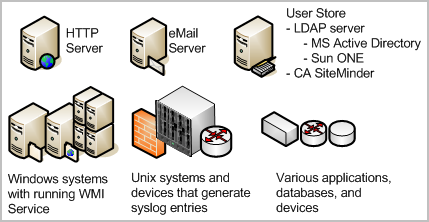
Operational efficiency demands a solution that consolidates all logs, makes logs easy to read, automates archiving to storage, and simplifies log restoration. CA User Activity Reporting Module offers these benefits, and lets you send alerts to individuals and systems when critical events occur.
It does not take long to set up a single-server solution and begin collecting events.
The installation disks include these components:
In the following illustration, CA User Activity Reporting Module is depicted as a server containing a small server, a dark (green) circle, and a database. The small server represents the local repository that stores application-level content. The dark circle represents the default agent, and the database represents the event log store where incoming event logs are processed and made available to queries and reports.
The dark (green) circles on the collection point and the other event sources represent separately installed agents. Installing agents is optional. You can collect syslogs from UNIX-compatible event sources with the default agent after completing the required configuration.
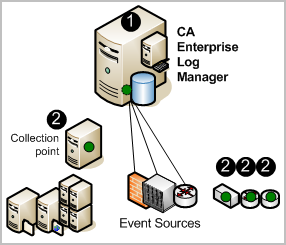
The numbers on the illustration refer to these steps:
Note: See the Implementation Guide for details on installing the soft appliance. See the Agent Installation Guide for details on installing agents.
|
Copyright © 2014 CA Technologies.
All rights reserved.
|
|