

This section contains information and procedures on planning subscription updates for your CA User Activity Reporting Module environment.
Your environment can have one server performing all tasks, or it can have several servers, each dedicated to performing one or more specific roles, such as collection, correlation and reporting. You use the Subscription Service to keep all of your servers up to date with the latest content, operating system and product updates.
The Subscription Service uses a proxy-client system to deliver updates. CA Technologies publishes updates, packaged into modules, to the CA Technologies Subscription Server. One or more servers in your environment act as subscription proxies. These proxies contact the CA Technologies Subscription Server over the Internet, download update modules, and self-install them. All other servers in your environment are subscription clients, downloading updates from the proxies in turn.
In some environments, security policies or other considerations restrict network access to the Internet. In these cases, you update your CA User Activity Reporting Module environment through offline subscription. Offline subscription requires you to download updates from the CA Technologies offline subscription FTP site. You then manually copy the updates to a CA User Activity Reporting Module proxy that does not have internet access, called an offline proxy. Updates proceed normally, with subscription clients downloading and installing updates from this offline proxy.
Note: By default, the Subscription Service is not configured to perform automatic updates. To use the Subscription Service, you must configure settings, such as choosing modules and setting an update schedule.
Subscription involves the following components:
You can configure subscription updates to proceed automatically, according to a subscription schedule you set. You can also perform subscription updates on demand, manually starting the update process as needed.
The following diagram illustrates the Subscription Service process in detail.
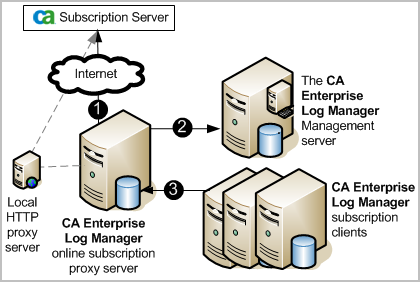
If you are using offline subscription, you manually download the update files to a system separate from your CA User Activity Reporting Module environment, and copy them to the offline proxy server.
Note: Subscription proxies install any updates they download before making them available to clients.
Planning the architecture of subscription updates for your CA User Activity Reporting Module environment lets you ensure that all servers receive the updates you select, in a timely and secure manner.
To plan subscription updates for your CA User Activity Reporting Module environment, complete the following process. For details, see the related procedures.
Consider how frequently to update your CA User Activity Reporting Module environment. Updates are available on a regular basis; the frequency depends on the type of update.
Note: Confirm that you have adequate disk space to download subscription updates to each CA User Activity Reporting Module server, before proceeding with subscription updates. If the available disk space on a server is less than 5 GB, the Subscription Service issues a self-monitoring event and suspends the download process.
Your CA User Activity Reporting Module environment can be a single-server system, or it can include two or more servers. Design your subscription architecture based on the number and roles of the CA User Activity Reporting Module servers in your environment. Possible subscription architectures include:
Note: When choosing a subscription architecture, consider whether you need one or more offline proxies.
The first CA User Activity Reporting Module server you install is configured upon installation as the default subscription proxy, which downloads and installs subscription updates if no other proxy is configured or available. Subsequent CA User Activity Reporting Module servers are, by default, configured as subscription clients. You can change the configuration of any CA User Activity Reporting Module server to act as an online or offline subscription proxy, or as a subscription client. You can also choose any online subscription proxy in your environment to act as the default subscription proxy.
The content server provides content and integration updates to the management server, which stores and retrieves application content for your environment. This server can be the default subscription proxy, or you can configure any online subscription proxy in your environment to act as the content server.
In a single-server environment, the sole CA User Activity Reporting Module server is configured as a subscription proxy. The server downloads and self-installs CA User Activity Reporting Module updates through the Subscription Service. The server also acts as the content server for the environment.
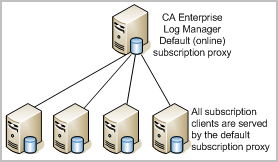
In a small environment with two or more servers, you can configure one server as both the subscription proxy and the content server, and all other servers as subscription clients. You can choose the default subscription proxy to act as the subscription proxy for your environment, or you can select any other CA User Activity Reporting Module server to be the proxy. The subscription proxy downloads and self-installs CA User Activity Reporting Module updates, and subscription clients contact the proxy to download their updates in turn. You can configure clients to download the same updates as the proxy downloads, or a subset of that group.
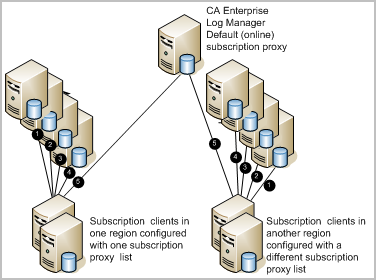
In a large multiple-server environment, you can configure multiple servers as subscription proxies, each one providing updates to a limited group of subscription clients. This allows the Subscription Service to work efficiently by balancing traffic to the subscription proxies.
With multiple proxies, you can also configure subscription proxy lists. Proxy lists help ensure that all CA User Activity Reporting Module servers successfully receive current updates in a timely manner. If a given proxy is unavailable when a client requests CA User Activity Reporting Module updates, the client contacts each proxy on its proxy list in turn until it succeeds in downloading the updates. You can configure a global proxy list for client updates, as well as for content updates, for your entire CA User Activity Reporting Module environment. You can also set a custom proxy list for client updates for each CA User Activity Reporting Module server.
If security policies or other considerations restrict network access to the Internet, you can update your CA User Activity Reporting Module environment through offline subscription. Offline subscription allows you to isolate some or all of your servers from the Internet while still keeping your CA User Activity Reporting Module environment up to date. Circumstances in which it is necessary to configure offline subscription include:
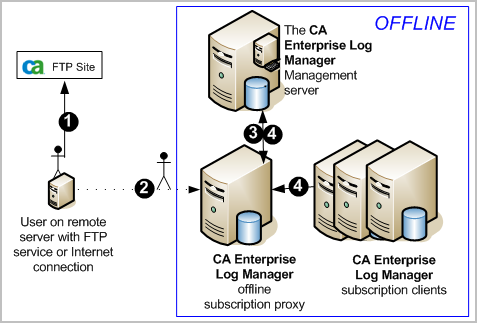
The only difference between online and offline subscription is how update files are delivered to the subscription proxy. In online subscription, the proxy contacts the CA Technologies Subscription Server over the Internet. In offline subscription, you download updates from a CA Technologies FTP site, then manually copy them to a CA User Activity Reporting Module server configured as an offline proxy.
The following diagram illustrates the offline subscription process. In this example, the entire CA User Activity Reporting Module environment is offline.
Note: You can allow the offline proxy to update itself as scheduled, it is good practice to perform a manual update on the offline proxy when you transfer new files. This practice ensures that the updates are available when subscription clients request them.
Note: Offline subscription clients always receive all updates that are manually installed on the offline proxy server. Subscription modules selected for an offline subscription client at the local level have no effect.
A subscription architecture can also be "mixed." For example, you can designate only one proxy as offline, while you designate others as online. The offline proxy and any clients assigned to it remain isolated from the Internet, while the rest of your CA User Activity Reporting Module environment receives updates through online subscription. Because of its complexity, a mixed architecture is not considered best practice. Carefully consider and plan your overall subscription strategy before implementing this architecture.
Important! In a mixed subscription environment, do not include offline proxies in the proxy list for any online subscription client. If you do, the online subscription client automatically receives all updates that are manually installed, instead of the modules you selected globally for your CA User Activity Reporting Module environment or locally for that client.
When you approach subscription configuration, consider the other roles the servers are performing before deciding on their subscription role. By default, the management server, the first server you install, is the default subscription proxy. All other servers are subscription clients of the default subscription proxy. While acceptable, it is better to configure an online subscription proxy and have the default proxy act as a failover or redundant proxy. A good practice is to assign the online proxy role to the least active server.
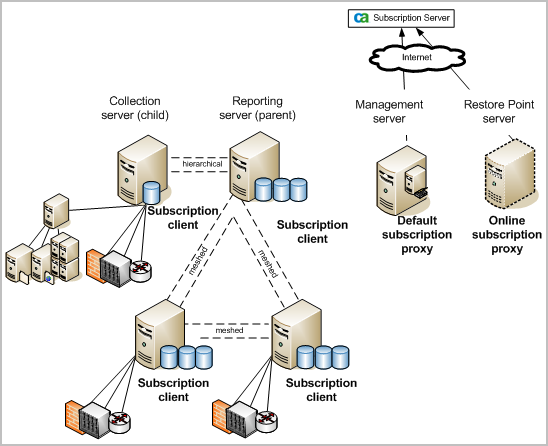
Example: Six Servers Where the Least Busy Server is the Online Subscription Proxy
Consider a scenario of six CA Enterprise Log Manager servers. The management server is dedicated to authenticating and authorizing users at login and storing application content. Four federated servers handle event processing and reporting. A sixth server is a dedicated restore point for investigating events from restored databases. An advantage of having a dedicated restore point is that you can keep old data from being included on current reports by not including this server in your federation.
In this example, the two servers labeled collection and reporting represent a configuration with exceptionally high processing requirements. These servers are federated in a hierarchical configuration, where the collection server is the child of the reporting server. The two servers that act as both collection and reporting servers represent a configuration with normal event volumes and scheduled reports. They are federated with each other and the dedicated reporting server in a meshed federation; that is, the three servers are peers. The purpose of federating servers is to extend the ability to get query results from the servers you federate. A federated query from any of the meshed servers returns events from itself and the other three servers in the federation.
Note: If you want to run consolidated reports on self-monitoring events, include the management server in the federation.
In this scenario, the recommended solution is to configure the restore point as the online subscription proxy because it is the least active server. Then configure each client to point to this online proxy, so the default proxy can act as a backup, if the online proxy is busy or unavailable.
|
Copyright © 2014 CA Technologies.
All rights reserved.
|
|