

|
|
|
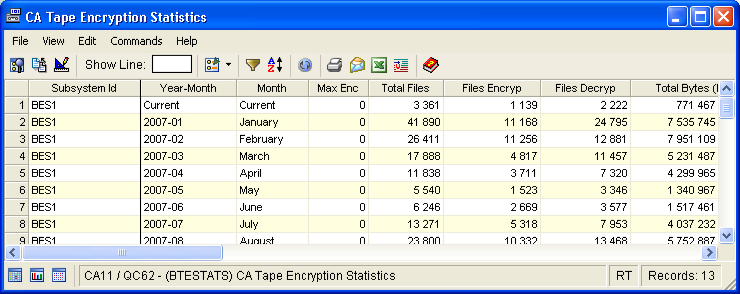
The Tape Encryption/Decryption Statistics window displays high-level encryption and decryption information for subsystems. Use this window to monitor the number of data set encryptions performed to ensure that you do not exceed the license limit. The window provides a month-by-month count of the number of tape file encryptions for the last 12 months. Separate counts are provided for the current month.
To open the display
The Object Tree is displayed in the Windows Client showing the CA Tape Encryption objects.
The Tape Encryption/Decryption Statistics window opens, as shown in the following sample:
| Copyright © 2010 CA. All rights reserved. | Tell Technical Publications how we can improve this information |