

|
|
|
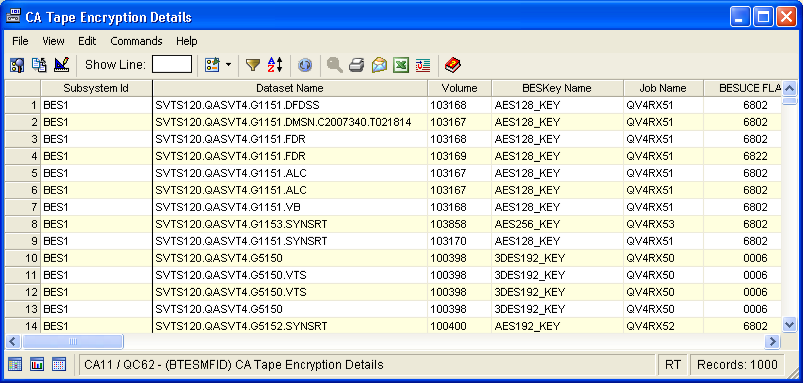
The Tape Encryption/Decryption Details window displays detailed information about the most recent 1000 encrypted or decrypted files for each active subsystem. The number of records is limited by a restriction in the BES database that only allows 1000 records per BES task to be stored.
Use the Tape Encryption/Decryption Details window to monitor the specific tape data sets you want to be encrypted and to track those that have been encrypted. The window provides an alternate view of information that is also included in a job log. For example, when you submit an encryption job, the job log will include messages indicating whether a data set was encrypted or decrypted.
After you submit a tape job to create a data set, the Tape Encryption/Decryption Details window will include an entry for that job when it completes. The entry includes the data set name, volume serial number, run date, key name and many more details.
To open the display
The Object Tree is displayed in the Windows Client showing the CA Tape Encryption objects.
The Tape Encryption/Decryption Details window opens, as shown in the following sample:
| Copyright © 2010 CA. All rights reserved. | Tell Technical Publications how we can improve this information |