

Managing Network Storage Objects › Register Indirectly Collected Computers › Specify Indirect Collection-NFS
Specify Indirect Collection-NFS
To specify indirect collection
- From the Open Systems menu of the CA SRM Windows Client, select Register, Network Storage, and then Computers and Domains.
You can also start the CA SRM Computer Registration Wizard by selecting Configuration, Register from the Computers table.
- Click Next on the Welcome dialog.
The Select Operating System dialog opens.
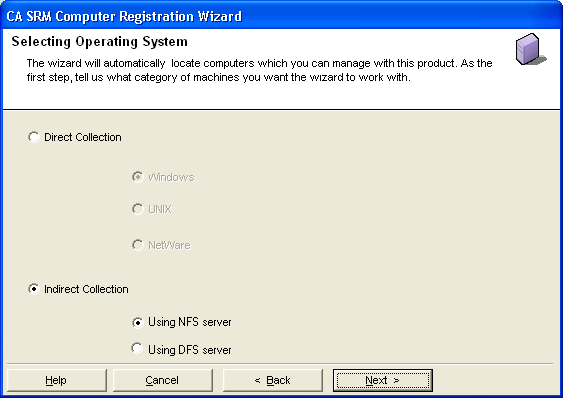
- Select Indirect Collection, NFS server, and click Next.
The Setting Properties for Indirectly-collected Computer dialog opens.
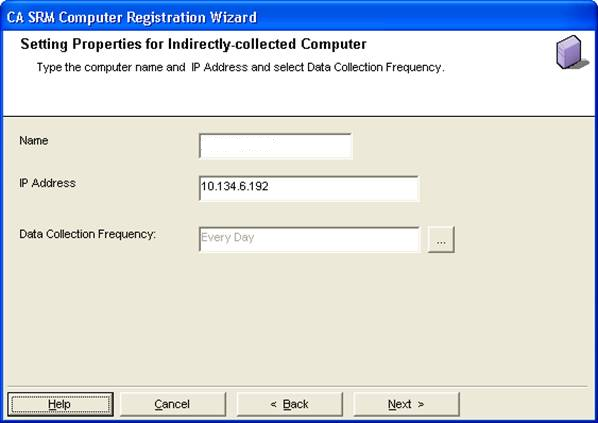
Type:
- Name—The name of the computer.
- IP Address—The IP address of the computer.
- Data Collection Frequency—By default, data gets collected once each day. To change the frequency, click the "…" button to open the Data Collection Frequency dialog.
- Click Next. The Setting Collectors dialog opens.
Note: SRM collects volumes from the indirectly-collected computer whose mount points are created from static IPs.
Copyright © 2016 CA Technologies.
All rights reserved.
|
|