Previous Topic: Selecting SolutionsNext Topic: Creating a New Solution


Customizing Solutions

You can customize your solutions, for example; you can add objects or views, change the order in the Solution display, remove objects or views, and so on.

To customize Solutions

  1. Click the Solutions icon on the main menu toolbar and click the Solution you want to customize.

    The Solution view is displayed. In the following example the solution titled "New SRM Solution" is selected:
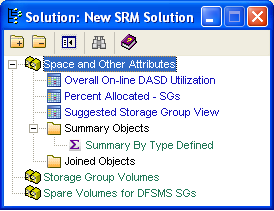
    This illustration is a screen shot example of the New SRM Solution dialog.

  2. Right-click an object in the Solution view

    The Solution options menu is displayed:
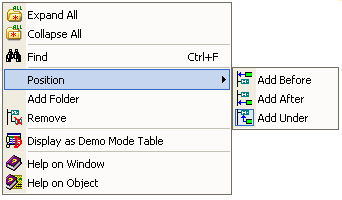
    This illustration is a screen shot example of the customize Solution right-click Options menu.

  3. Select the operation you want to perform and the Solution view is updated accordingly.