

If you installed the CA SRM Application Server, which automatically installs the Windows Client also, the CA SRM Application Server is automatically added to the host list for the client, and the client automatically connects as soon as installation completes.
If you installed only the Windows Client, you must manually define the host and then connect to it. Use the Host Definition dialog to add a new z/OS host definition.
You can start the Host Definition dialog the following ways:
You can also use the Host Definition dialog to review and modify host definitions. Right-click the host definition you want to view or modify, then click Host Definition from the pop-up menu to display the Host Definition dialog.
The following shows a sample of the Open Systems Host Definition dialog:
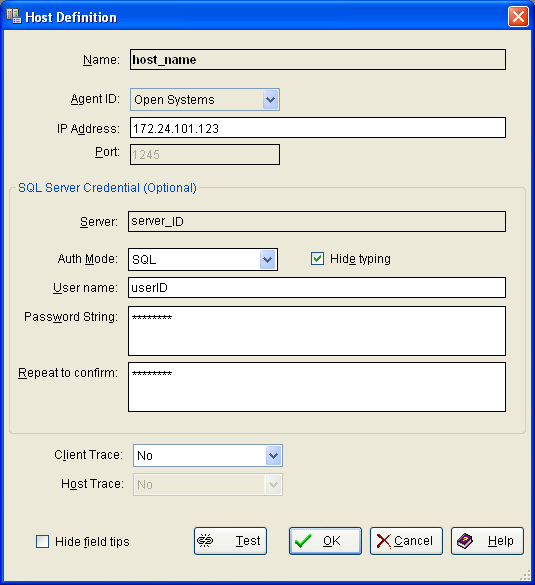
The Host Definition dialog displays all of the parameter settings for that specific host. You can modify any of the parameters.
The user and password defined here are for the login to the MS SQL Server database open systems host. That is, the user and password known to access the SQL Server DB. Do not confuse these with the optional user and password for starting the Windows Client itself.
The SQL Server is the name of the SQL Server instance which is non-editable, and the authentication mode is the selected SQL or the Windows authentication mode.
|
Copyright © 2013 CA.
All rights reserved.
|
|